Project management at IMC.
Start from IMC context, existing project delivery and explore what could be learnt from proven methodologies to improve.
- To build a shared understanding about IMC's current way of working (from all teams: BD, R&D, Production, and International Market Development).
- To map IMC's context & needs to universal project management language (PMP/ PMBOK 8).
- Identify improvements opportunities & actions from next Monday.
Common problems from the survey: scope changes, unclear roles, plans that do not match reality, and information that does not flow between functions
This course gives you ONE answer to "WHAT TO DO about it." Not the only answer. Not a complete answer. But a shared starting point we can pilot, measure, and improve.
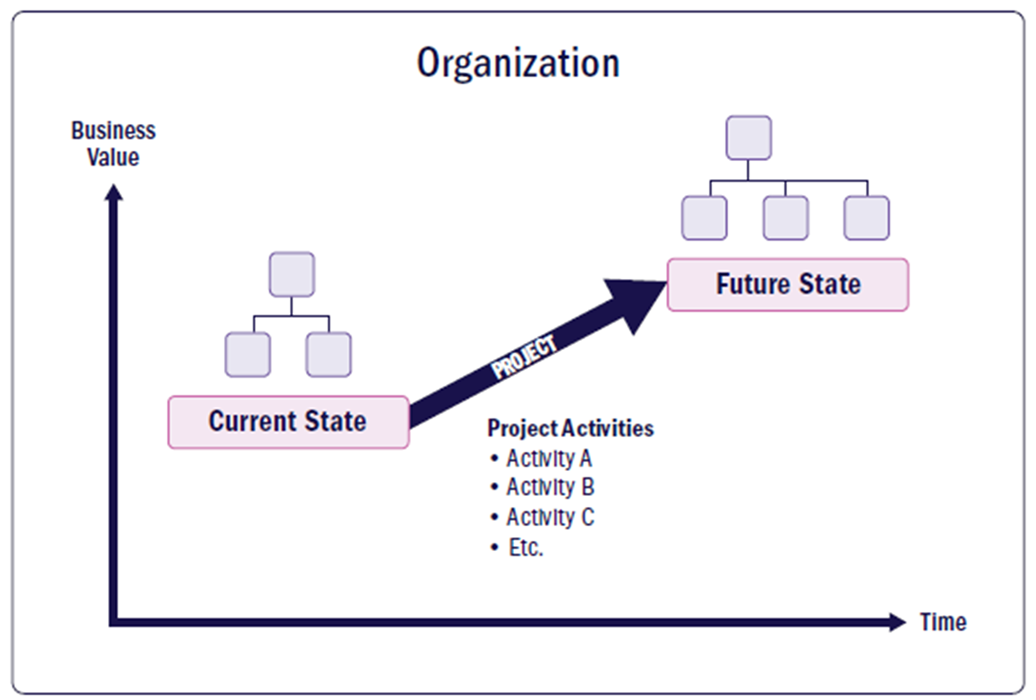
What you will leave with
Structured across the three sessions:
- Session 1 — PM Foundation: a shared vocabulary across BD, R&D, QA, Production, and International (same words for the same things), and a portfolio view of IMC's projects.
- Session 2 — The toolkit: PM Map, mindset, approaches; and 4 lightweight tools you can use Monday morning.
- Session 3 — Continuous Improvement: PDCA, PDSA (Deming cycle) to drive real improvements.
A brief intro about PMI
We don't invent a method here — we stand on the most widely adopted one. PMI (Project Management Institute) is the global professional body for project management: it publishes the PMBOK® Guide (now 8th Edition) and administers the PMP® credential — the common root and reliable source this course draws from.
- More than 1.6 million people hold the PMP worldwide, across 200+ countries — a shared language used the world over.
- In Vietnam it is still young and growing — an estimated ~6,000 PMP holders — so this is a credible, in-demand foundation to build on.
- We use this global standard as a map and common language, not as exam prep — so every function can describe the same things the same way, and anyone can go deeper at the source after the course.
This course provides a foundation and project management methodologies will keep changing with business environments.
--> Continuous improvements and changes are required for long-term survival.
2026
What the survey told us
Surface common symptoms and analyze root causes and needs.
Before the course was designed, BD, R&D, Production, and International Market Development each filled out the same survey. The questions covered short-term and long-term goals, recent satisfactions, root causes of friction, and what could be changed/ improved.
Got some observations in four different voices.
The Survey
| Team | problems & Needs |
|---|---|
| Business Development | - Standardize the BD–R&D–QA–Production workflow. - Reduce cycle time from request → proposal → pilot. - Clarify roles, responsibilities, expected timeline of each department in project. - Longer term: standardize PM methodologies (status reports, information syncs). - Improve cross-functional collaboration - apply for big/ international customers. - Challenges with new product requests, frequent customer changes, hard to control scope, timeline between departments. WHAT TO DO? |
| R&D | - Control scope and schedule as in plans. - Ensure project members knows their tasks, project tasklist and have clear guideline, process to do (SLA? & service categories?). - Planning better to forecast resources, time effectively, minimize wastes. |
| Production | - Complete on-going tasks & review operational process, guidelines. - Standardize KPIs aligned with company objectives → performance assessment. - Build production data, anytime can check full historical production data to support decision-making. - Enhance people capabilities, PDCA & Quality management in systematic way. - Too many in-flight projects & individuals need to join multiple projects at the same time. - Deadline pressure impacts cross-departments coordination. - Impacts by internal, external factors. - Improve Schedule, Risk & Change management. - All departments follow common principles/ rules: document what needs to be done & follow it. |
| International Market Dev | - Pre-project assessment is weak & need to improve business domain, technical
knowledge. - Need information to be shared/ transparent across departments. - Need clear project lead and framework to follow. |
Mapping to universal PM vocabulary
- Project fundamentals (org matrix, env factors, lifecycles, development approaches).
- Governance framework, project dashboard, risk.
- Project constraints: Scope, Schedule, Resources, Finance.
Every cross-functional organization in the world has a version of this list. The good news: problems are solvable. The next three sessions are about HOW.
Session 1 — PM Foundation
Start with PM foundations and map to IMC context.
▶ Open Section 01 SlidesOutcomes
- WHY organizations need projects — what they are, and why they succeed or fail
- WHAT a project is — project vs. operations, and IMC's own project types
- HOW IMC governs projects — the 5 things every project needs, the Charter, and RACI
- See the big picture — build a real one-page IMC Project Portfolio Dashboard for a live project
WHY projects?
Organizations need a vehicle to turn ideas into realities. Deliver business value or solve problems for customers.
Without projects?
- Nokia would still be a wood mill in Finland.
- McDonald’s would still be a restaurant in California.
- Starbucks would still be a small coffee store in Seattle.
Projects exist for one reason:
To turn ideas into reality.
Not someday.
Not accidentally.
But systematically.
At scale.
Every company transformation:
- new product
- global expansion
- digital transformation
- AI adoption
- cloud migration
...starts as a project.
Projects are how organizations change reality.

IMC's Big Ideas?
- New field?
- New strategic product?
- New international market?

WHAT is a project?
A project is a temporary endeavor undertaken to create a unique outcome (product, service, or result...).
The 3 defining characteristics
| Characteristic | What it means in practice |
|---|---|
| Temporary | It has a defined start and a defined end. A project that never closes has become an operation — or a symptom. |
| Unique | No two projects are identical. Copying last year's approach without adapting it is a leading cause of failure. |
| Outcome | The goal is not activity — it's a result that the organization can use. Deliverables serve the outcome, not the other way around. |
What a project is NOT
- An open-ended workstream with no clear end state
- A recurring task dressed up in a Gantt chart
- A department's entire backlog bundled together

HOW — IMC governs projects?
Governance answers the question: who decides what, when, and how do we know things are on track? Without it, projects drift.
What governance covers
| Governance element | At IMC today |
|---|---|
| Project authorization | How is a project formally approved to start? objectives? constraints? |
| Roles & accountability | Who owns delivery? Who sponsors it? Who is consulted? |
| Communication model | How does leadership see status across all projects? regular meetings? reports? escalation? |
| Project Workflow/ Approach/ Framework | Guide the team & stakeholders on day-to-day workflow. How & When things will be planned, delivered, verified, changed. |
| Closure & lessons | How does IMC formally close a project and capture what it learned? Organization Process Asset. |
5 things every project needs
Strip a project to its minimum viable structure — five things. If any are missing, you will see the symptoms.
- Goal (the why) — one sentence on the outcome and why it matters.
- Scope (the what & what-not) — name what is out of scope to prevent drift.
- Owner (who decides) — one person with authority to decide on conflict or trade-offs.
- Plan (how) — major work streams, rough sequence, owners, what could go wrong. One page is enough.
- Heartbeat (how we know we are on track) — the cadence of status updates and decision points that keeps information flowing.
The gap we are closing
IMC's operating model/ Governance Framework are defined from the above.
IMC participants flagged unclear ownership and lack of status visibility as their top two project pain points. Both are governance problems, not execution problems.
Project vs. operations
A confusion that sounds academic but causes real damage when teams treat one as the other.
Both are work. Both have outputs. Both consume resources. The difference is in the shape of the work and what kind of management it needs.
| Project | Operations | |
|---|---|---|
| Goal | Deliver a unique outcome | Sustain a steady output |
| Lifespan | Has a beginning and an end | Continuous |
| Team | Often cross-functional, temporary | Usually within one function, stable |
| Success | Outcome delivered, project closes | Performance held against KPIs |
| Examples at IMC | New product development, factory build, customer-driven OEM project, market entry | Daily QA testing, weekly production runs, monthly financial close |
Why this distinction matters at IMC
Projects fail when they are managed like operations. The team uses operational rhythms (steady, function-level operations), but the project has a unique outcome that needs different management — explicit scope, named owners across functions, risk anticipation, and a clear close.

Pick something you spent time on this week. Ask: did it have a unique outcome with an end date, or was it
a steady output that will continue next week? Most teams have a mix. The mistake is not noticing which is
which.
What makes projects fail?
Five universal causes that show up in every cross-functional product organization. IMC is not an exception.
The 5 causes
1. Initial plan does not match reality
The plan was made with optimism, with too little discovery, or with people who did not know the work. By week 4 the timeline already does not hold.
2. Scope changes mid-project
The customer asks for one more thing. Marketing notices a gap. Leadership has a new idea. Each change individually seems small. Together they reshape the project — without reshaping the timeline or the resources.
3. Resources are insufficient
The same people are committed to multiple projects at once. Officially each project has the resources it needs. In practice, no project has the people for the time the work requires.
4. Cross-functional coordination is rough
Each function does its work well in isolation. The handoffs between functions are where the project loses days, weeks, sometimes the whole quarter. Information that one function has does not reach the function that needs it.
5. Priorities shift, projects get abandoned
A more urgent thing comes up. The project does not get formally cancelled — it just stops. Months of work sit half-finished. When priorities shift back, the team starts from scratch because the partial work is no longer current.
Why these are not IMC's fault
These five causes show up in every cross-functional product organization in the world — startups, multinationals, government programs, university research, manufacturers. Naming them does not change them. Designing the work so they have less room to operate is what changes them.
The next sessions are about that design.
IMC's project types
Five recognizable shapes of project work at IMC today. Each has a different management profile.
The 5 things every project needs (previous page) apply to all of these. But the how changes a lot depending on the shape.
Customer-driven OEM/ODM
A customer specifies what they want. IMC formulates, tests, manufactures, and delivers. Cross-functional: BD-led intake, R&D formulation, QA validation, Production. Mostly familiar territory. The risks are usually scope creep (customer changes spec) and timeline.
Internal new product development
IMC develops a product on its own initiative for a market it has identified. Same functions involved, but no external customer driving timeline. Different risks: market validation, prioritization against other internal projects.
New-field exploration
IMC enters a domain where the technology, partners, or regulatory path are not yet known — biotech, water tech, agritech. The risk is fundamental: we may not know whether the work is feasible. Treating this like an OEM project is the most common and most expensive mistake.
Capability projects (factory build, system rollout)
The output is not a product but a capability. Different success criteria, longer timelines, different stakeholders. Mentioned in survey by the Production team.
Market entry
Taking an existing product into a new geography or channel. Mostly BD and International Market Development. Different from OEM in that the deliverable is not a product but a market presence.

Project Canvas helps to build a common understanding about goal, objectives, constraints.
--> That drives Governance approach, processes for teams.
Activity — IMC Project Dashboard
In your department group, list the projects your department is involved in. Capture each project's highlights on the dashboard — status, owner, next milestone, and the decision you need.
Format
- By department — 5–6 members per group
- 15 minutes to list your projects and capture highlights, then share-back
- One servant leader per group — not the manager. A peer who draws out every voice, keeps the list moving, and speaks for the group at share-back.
Group instructions
- List the projects your department is currently involved in.
- For each project, capture its highlights on the dashboard: status, owner, next milestone, and the decision you need.
- Lead with the headline — status plus the one decision you need, not an activity log.
- Share-back: combine your dashboards to build the holistic view — together.
When the groups combine their dashboards, does the same project show up differently across departments? That gap is the portfolio problem — and why no one department sees the whole board.
Sample dashboard
Open the live IMC Project Dashboard to see a worked example of the 5-things framework in action. Use it as a reference while your group fills in your own.
▦ Open Project DashboardSession 2 — The toolkit
Reframe the role of the PM, place the global standard in context, and learn four lightweight tools that punch above their weight.
▶ Open Section 02 SlidesOutcomes
- PM Map — how a PM thinks (Mindset), which delivery approach to use (Predictive · Adaptive · Hybrid), and the 5 focus areas
- 7 Performance Domains — Governance · Scope · Schedule · Finance · Stakeholders · Resources · Risk, as reference vocabulary
- A toolkit for IMC — 4 lightweight tools you can use Monday morning: Charter / Project Canvas · Governance · RAID Log · RAG Report
PM Map
PMBOK gives us a universal standard. This section adapts it to IMC's context — who plays what role, how a PM thinks, where to focus, and which domains matter most.
The map covers
Four sub-pages build the full picture of PM practice at IMC.
Project Management in 1 page
The whole of PMBOK 8 distilled onto a single sheet — the field guide to keep beside you. Open it as a full page, or download the PDF.
5 Focus Areas
5 PM focus areas, it's not linear. Multiple loops can be overlapped for multiple phases/ big trunks of work.

7 Performance Domains
PMBOK 8 organises PM practice into 7 performance domains — the lenses a PM applies throughout a project. We use them as a map, not a checklist.

IMC's survey pain points cluster in four domains. The other three still exist — you just don't need to zoom in on them first.
PMBOK is a standard, not a prescription. IMC does not need all 40 processes. The 7 domains are the lens — the toolkit pages that follow give you the tools most relevant to IMC's project types.
PM Mindset
How a PM thinks and behaves matters as much as what they do. These mindset traits and principles are the foundation that makes tools and processes actually work.
3 Mindset & Behaviors

Anticipate problems, risks, and decisions before they become crises. A reactive PM is always catching up; a proactive one shapes what happens next.
Take responsibility for outcomes, not just activities. If something is unclear, unclear is the PM's problem to fix. If the team is blocked, unblocking is the PM's job.
Weigh every decision against the value it delivers. Busyness is not progress. The PM constantly asks: does this bring the project closer to a result that matters?
6 Principles
Governance
How a project is authorised, overseen, and kept accountable to its sponsor and organisation.
What it covers
Governance defines who has decision rights, how escalations flow, and how the project is connected to organisational strategy. Without it, projects drift — decisions get made by whoever is loudest rather than whoever is accountable.
Key practices
- Project Charter — written authorisation naming the PM, sponsor, scope, and success criteria
- RACI — explicit roles on every key decision; prevents the "unclear ownership" failure mode
- Change control — a lightweight gate that prevents scope creep from accumulating silently
- Escalation path — every PM knows which decisions need sponsor sign-off and how fast

The survey flagged unclear decision ownership across all 4 teams. Governance is where that pain is addressed.
Where governance sits
Governance is the layer above day-to-day project management. The PM runs the project; governance decides whether the project should continue, change, or stop — and who is allowed to make that call. PMBOK 8 connects three levels: the portfolio (are we doing the right projects?), the programme (are related projects coordinated?), and the project (are we doing this one right?). Project governance is the thread that keeps a single project aligned to that bigger picture.
Decision gates
The most practical governance tool is the decision gate (or stage gate): a scheduled checkpoint where the sponsor or steering group reviews progress and makes an explicit go / hold / pivot / kill decision before the project is allowed to spend the next tranche of money and time.
| Gate | The question it forces |
|---|---|
| After initiation | Is the business case still valid — should we plan in detail? |
| After planning | Is the plan credible and resourced — should we execute? |
| Before launch / handover | Is it ready, and has the receiving team accepted it? |
Gates are what stop a failing project from quietly consuming budget because no one was empowered to halt it.
Tolerances — governing without micromanaging
Good governance is not the sponsor approving everything. It sets tolerances — agreed thresholds for cost, schedule, and scope within which the PM acts freely, and beyond which they must escalate. "You can absorb up to 10% schedule slip; past that, come to me." This is what turns an escalation path from a vague promise into a clear trigger.
For larger IMC projects, governance takes the form of a small steering committee — sponsor plus the function leads whose resources are at stake — meeting at gates and on escalation. Its job is decisions, not status updates: the RAG report handles status; the committee handles the calls only it can make.
Scope
What the project will — and will not — deliver. Defining it clearly is the first act of PM discipline.
What it covers
Scope management is the practice of agreeing on boundaries and defending them. It answers two questions and keeps answering them as the project runs: what are we producing (the deliverables — product scope) and what work is required to produce it (the project scope). Get the boundary wrong at the start and every other domain — schedule, cost, resources — inherits the error.
The scope baseline — three documents
In PMBOK 8 the approved scope is captured in three connected artefacts. Together they form the scope baseline — the reference everything is measured against and the thing a change request has to formally move.
| Artefact | What it is | What it answers |
|---|---|---|
| Scope statement | A written definition of the deliverables, acceptance criteria, exclusions, assumptions, and constraints. | "What does done look like, and what is explicitly not included?" |
| WBS (Work Breakdown Structure) | A hierarchical decomposition of the total scope into progressively smaller deliverables, down to work packages small enough to estimate and assign. | "What are all the pieces — and is anything missing?" |
| WBS dictionary | A companion to the WBS describing each component: owner, definition, acceptance criteria, dependencies, and rough effort. | "What exactly does this box mean, and who owns it?" |
The WBS — decompose before you estimate
A common failure is to estimate a deliverable as one big number. The WBS forces you to break it down first. The rule of thumb: keep decomposing until each work package can be reliably estimated, assigned to one owner, and tracked. The classic 100% rule applies — the children of any box must sum to exactly the parent; nothing extra, nothing missing.
WBS example:

| 1.0 Product registration | Decomposed into work packages |
|---|---|
| 1.1 Dossier preparation | 1.1.1 Formula & spec sheet · 1.1.2 Stability data · 1.1.3 Label artwork |
| 1.2 Regulatory submission | 1.2.1 Translate dossier · 1.2.2 Submit to authority · 1.2.3 Respond to queries |
| 1.3 Approval & handover | 1.3.1 Receive licence · 1.3.2 Brief commercial team |
Two ways scope goes wrong
Scope creep — scope expands gradually through small, uncontrolled additions that were never assessed or approved. Each "just one more thing" looks harmless; together they sink the schedule.
Gold plating — the team adds features or polish the customer never asked for, believing it adds value. PMBOK 8 is explicit: scope management endorses neither. Deliver what was agreed — no less, and no unrequested more.
Key practices
- Scope statement + In/Out list — one written definition of success, with an explicit list of exclusions that is as important as the inclusions
- Build a lightweight WBS — even 2–3 levels turns a vague goal into estimable, ownable work packages and surfaces forgotten work early
- Change control — every scope addition is logged, assessed for schedule/cost impact, and approved before work begins; this is the only legitimate way the baseline moves
The survey's top pain: scope creep. All 4 teams named it. A clear scope statement plus a one-page WBS is the direct, low-cost answer — it makes "is this in scope?" a question with a written answer.
Schedule
A realistic, maintained timeline — not an optimistic wish list produced at kickoff and never touched again.
What it covers
Schedule management turns the scope into a sequence of work with dates, owners, and dependencies. The PM's job is not to produce a perfect Gantt chart — it is to produce a schedule the team believes and updates weekly. The discipline runs in a clear order: take the work packages from the WBS, list the activities inside each, sequence them by dependency, estimate durations, then build the model.
From work packages to a timeline

| Step | What you produce |
|---|---|
| 1. Define activities | The actions needed to produce each work package |
| 2. Sequence | Dependencies — what must finish before what can start (finish-to-start is the common one) |
| 3. Estimate durations | How long each activity takes, with whom |
| 4. Build the schedule model | Calculate the timeline, the critical path, and float & Adjust on the way |
Critical Path Method (CPM)
The critical path is the longest chain of dependent activities through the project — and therefore the shortest possible time the whole project can take. Activities on it have zero float (also called slack): delay any one of them by a day and the project end date moves by a day. Activities off the critical path have float — they can slip a little without hurting the finish.
Why a PM cares: it tells you where to focus. You protect the critical path fiercely and you can borrow people from non-critical activities (within their float) without panic. A milestone plan of 5–8 key dates is the lightweight version most IMC projects actually need.
Visualising it — the Gantt chart
A Gantt chart shows activities as horizontal bars across a calendar, with their dependencies and the critical path highlighted. It is the most common way to communicate a schedule to a sponsor because it makes overlaps, handoffs, and slippage visible at a glance — no spreadsheet literacy required.
When the deadline won't move — schedule compression
Sometimes the finish date is fixed and the plan doesn't fit. PMBOK 8 names two compression techniques — and the difference matters because they cost different things.
| Technique | How | Trade-off |
|---|---|---|
| Fast tracking | Run activities that were sequential in parallel instead (e.g. start drafting before the design is fully signed off). | Costs little money but adds risk and rework — you commit before the upstream work is final. |
| Crashing | Add resources to critical-path activities (more people, overtime) to shorten them. | Costs more money and has diminishing returns — nine women can't make a baby in one month. |
Both techniques only shorten the project if applied to critical-path activities. Crashing a task that already had float just burns budget for zero schedule gain.
Key practices
- Milestone plan — 5–8 key dates the whole team can name; visible in every status update
- Dependency mapping — which tasks block others; cross-function handoffs get explicit dates and owners
- Weekly update cadence — the schedule is live; updated at the weekly heartbeat, not rediscovered at a quarterly review
Survey teams said "initial plans don't match reality." That is a scheduling-discipline gap — plans are made once but never maintained. Naming the critical path and updating it weekly is what turns a kickoff Gantt into a tool the team actually trusts.
Finance
Budget visibility so the project doesn't run out of money silently or blow its allocation without a decision being made.
What it covers
Finance management in a project context means tracking actual spend against an approved plan, flagging variances early, and giving the sponsor the information needed to make resource decisions. It is not accounting — it is PM-level visibility into where the money is going and whether that still makes sense.
How a project budget is built up
PMBOK 8 builds the budget in layers, and the names matter because each layer has a different owner and a different rule for being touched.

| Layer | What it is | Who releases it |
|---|---|---|
| Work package estimates | The summed cost of all the estimated work | The PM / team |
| + Contingency reserve | Money for known risks ("known-unknowns") that have response plans | The PM, within the baseline |
| = Cost baseline | The approved, time-phased spend plan — the comparison point for every variance | Changed only via formal change control |
| + Management reserve | Money for unknown-unknowns — unforeseen work within project scope | The sponsor / management, not the PM alone |
| = Project budget | The total authorised funding | — |
A reserve is a deliberate provision for risk, not a fudge factor. The key distinction: contingency reserve sits inside the baseline and covers risks you already identified; management reserve sits outside it and requires sponsor approval to release. Mixing them up is how PMs lose the trust of finance.
CapEx vs. OpEx
Sponsors and finance teams classify project spend two ways, and which bucket a cost lands in changes how it is approved and reported.
| CapEx (capital expenditure) | OpEx (operating expenditure) | |
|---|---|---|
| What | Spend on lasting assets — equipment, a new line, software licences capitalised over years | Day-to-day running cost — salaries, materials, subscriptions, consumables |
| Example at IMC | Buying lab equipment for a new product category | The team's time and travel to run the project |
Cost of Quality (CoQ)
Quality is not free, but neither is the lack of it. Cost of Quality is the total cost of conformance plus non-conformance:
- Cost of conformance — money spent to prevent defects: training, reviews, prevention, inspection/appraisal.
- Cost of non-conformance — money spent because defects happened: rework, scrap, warranty, lost reputation.
The PM argument it gives you: a little prevention spend up front (the cheaper conformance side) avoids the much larger failure cost later. Skipping a review to "save time" is almost always a false economy.
Key practices
- Cost baseline — approved, time-phased spend plan at kickoff; the comparison point for all variances
- Spend tracking — actual vs. planned, updated in the weekly status report, not reconciled at the end
- Variance escalation — threshold defined upfront: if spend exceeds X%, the PM flags to the sponsor before spending further
Budget overruns were not the top survey pain, but insufficient resources was — which often starts as a finance-visibility gap. A simple cost baseline plus a weekly actual-vs-planned line turns "we ran out" into a variance the sponsor could have seen coming.
Stakeholders
Who has a stake in the project — and how to keep them informed, aligned, and in the right decision loop.
What it covers
Stakeholder management means identifying everyone who is affected by — or can affect — the project, understanding what they need to stay aligned, and designing communication that reaches them at the right frequency and depth. It is the antidote to info silos, and PMBOK 8 treats it as the first performance domain because a misaligned stakeholder can sink a technically perfect project.

Step 1 — Identify: the Stakeholder Register
You cannot manage who you have not named. The stakeholder register is the living list of everyone with a stake — internal and external — with enough detail to act on.
| Name / group | Role & interest | Influence | Engagement need |
|---|---|---|---|
| Sponsor (BoD) | Funds & authorises; wants ROI | High | Brief monthly; escalate decisions |
| Function leads | Supply the people; want minimal disruption | High | Weekly sync; co-own resourcing |
| End users / commercial | Use the output; want it to work | Medium | Demo at milestones |
Step 2 — Prioritise: the Power / Interest matrix
You can't give everyone the same attention. The Power × Interest grid sorts stakeholders into four engagement strategies based on how much power they hold and how much interest they have in the outcome.
| Low interest | High interest | |
|---|---|---|
| High power | Keep satisfied enough to not block you |
Manage closely your key players — sponsor, leads |
| Low power | Monitor minimum effort |
Keep informed they care, so feed them updates |
Step 3 — Plan the engagement
For key stakeholders, assess current vs. desired attitude — unaware → resistant → neutral → supportive → leading — and plan the actions that close the gap. The stakeholder engagement plan records that intent: a resistant function lead you need to move to "supportive" is a deliberate piece of work, not a hope.
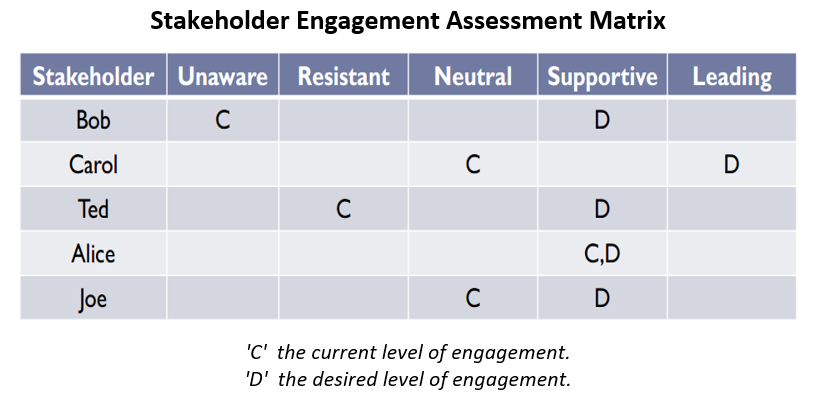
Step 4 — Communicate
The communication plan turns engagement intent into a routine: who gets what information, at what frequency, in what format, from whom. Done once, it removes the constant "should I have looped them in?" tax.
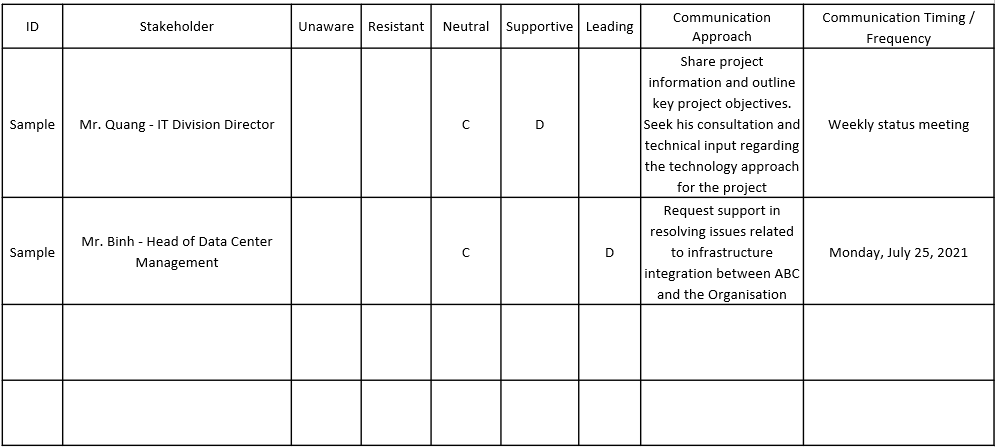
The number of communication channels in a team of n people is n(n−1)/2. A team of 5 has 10 channels; a team of 10 has 45. This is why a deliberate communication plan matters — informal "everyone tells everyone" stops scaling fast.
Key practices
- Stakeholder register — everyone with a stake, their role, influence, and communication need
- Power/Interest sort — decide who you manage closely vs. simply keep informed; spend attention deliberately
- Communication plan + RAG report — the status report is the PM's primary tool for keeping stakeholders aligned with no surprises
The survey named info silos and cross-department coordination gaps as top pain points. A stakeholder register plus a one-page communication plan is the direct answer — it makes "who needs to know this?" a question with a written answer.
Resources
People, time, and materials — secured, allocated, and tracked so the project can actually execute what it promised.
What it covers
Resource management ensures the project has the people, time, and materials it needs; that allocation conflicts are visible early; and that team members are not silently over-committed across several projects at once. It turns "insufficient resources" from a complaint into a visible, negotiable constraint.
Estimating what you'll need
Before you can secure resources you have to estimate them. PMBOK 8 names three techniques that trade speed against accuracy — and good PMs use all three at different moments.
| Technique | How it works | When to use |
|---|---|---|
| Analogous (top-down) | Estimate from a similar past project — "the last registration took 3 people, 8 weeks." | Early, when detail is thin. Fast, cheap, least accurate. |
| Parametric | Use a measured rate × quantity — "200 SKUs × 0.5 days each = 100 days." | When you have a reliable unit rate. More accurate than analogous. |
| Bottom-up | Estimate every work package in the WBS, then roll up. | Once the WBS exists. Slowest, most accurate — the basis for the baseline. |
Bottom-up estimating is only as good as the WBS it sits on — another reason scope work comes first. No work package, no honest estimate.
The resource calendar
A resource calendar records when each person or asset is actually available — working days, holidays, the 40% they're already promised to another project. A schedule that ignores availability is fiction. The calendar is what turns "Sue will do it" into "Sue has 2 days/week free in March."
Smoothing the peaks — levelling vs. smoothing
A first-pass schedule often over-allocates people — Tom is booked 12 hours on Tuesday. PMBOK 8 names two optimisation techniques to fix this, and the difference is whether the end date is allowed to move.
| Technique | What it does | Effect on dates |
|---|---|---|
| Resource levelling | Delays activities to respect availability limits (no one over 8 hrs/day). | May extend the project — the critical path can change. |
| Resource smoothing | Adjusts activities only within their float, so no over-allocation but the critical path is untouched. | End date stays fixed — but can't always fully resolve overloads. |
Rule of thumb: try smoothing first (it's free — it uses slack you already had); fall back to levelling when smoothing can't absorb the overload and you'd rather move the date than burn the team out.
Key practices
- Resource plan — who is needed, for how many hours/week, across which phases
- Capacity check — validated against resource calendars with Function Leads before committing the schedule
- Conflict escalation — when one person is committed to two projects at once, the sponsor decides priority — not the PM alone
All 4 survey teams named insufficient resources and people "joining multiple projects at the same time" as top pains. Resource calendars plus an honest capacity check are where that overload becomes visible — and therefore negotiable — instead of a silent cause of slippage.
Risk
What might go wrong — and what the team will do about it before it does.
What it covers
Risk management is the practice of naming uncertainty early enough to act on it. A risk is any uncertain event that, if it occurs, has an effect on objectives — a threat (negative) or an opportunity (positive). A risk log is not a list of worries; it is a prioritised set of decisions about where to invest prevention effort now versus accept consequence later.

The risk process
| Step | What you do |
|---|---|
| 1. Identify | Surface risks — from the team, past projects, assumptions, and the schedule's critical path. Write them down. |
| 2. Qualitative analysis | Score each risk by probability × impact and rank them. Fast, subjective, done for every risk. |
| 3. Quantitative analysis | Put numbers on the top risks — cost/schedule effect, e.g. expected monetary value. Done only for the big ones, when it's worth the effort. |
| 4. Plan responses | Decide a deliberate action for each significant risk (see below). |
| 5. Monitor | Review at every heartbeat — risks change, close, and appear as the project runs. |
The key split most people miss: qualitative analysis ranks everything quickly so you know what to worry about; quantitative analysis sizes only the top risks in money or time. You don't model every risk — that's wasted effort.

Response strategies
Once a risk is significant, "keep an eye on it" is not a plan. PMBOK 8 gives four strategies for threats (mirrored for opportunities):
| Strategy (threat) | Meaning | Opportunity mirror |
|---|---|---|
| Avoid | Remove the cause — change the plan so the risk can't occur. | Exploit |
| Mitigate | Reduce probability or impact before it happens (the most common active response). | Enhance |
| Transfer | Shift the impact to a third party — insurance, warranty, fixed-price contract. | Share |
| Accept | Take it on consciously — and set aside a contingency plan/reserve for if it occurs. | Accept |
Mitigation acts now to make the risk less likely or less damaging. A contingency is a pre-agreed plan (and reserve) you trigger if the risk actually happens — "Plan B, already written." Good risk plans usually have both.
One log to rule them — RAID
In practice, risks rarely live alone. The lightweight tool most IMC projects need is a single RAID log:
- Risks — uncertain future events, with probability, impact, owner, response
- Assumptions — things taken as true that, if wrong, become risks
- Issues — risks that have already happened and need action now
- Dependencies — things outside the team's control that the plan relies on
One spreadsheet, reviewed weekly, covers what four separate documents would. (A blank and a worked RAID log are in the Session 2 handouts.)
Key practices
- RAID log — a living register with probability, impact, owner, and response (avoid / mitigate / transfer / accept)
- Review cadence — revisited at every weekly heartbeat, not a one-time exercise at kickoff
- Top-3 risks in the status report — visible to the sponsor at all times; no surprises at close
IMC's expanding new-field work — international market development, new product categories — carries high uncertainty. A simple RAID log reviewed weekly prevents known-unknowns from becoming emergencies, and gives the sponsor the early warning the survey said they currently lack.
PM Approaches
There is no single "right" way to run a project. PMBOK 8 names three delivery approaches — Predictive, Adaptive, Hybrid — and the PM's job is to pick the one that fits the project's certainty, not the one that is fashionable.
1. Predictive (plan-driven)
Plan the whole thing up front, then execute against the plan. Scope, schedule, and cost are fixed early and change is controlled. Best when requirements are well understood and stable — construction, regulated rollouts, fixed-scope vendor contracts. Strength: predictability. Risk: late discovery that the plan was wrong.

2. Adaptive (agile / iterative)
Deliver in short cycles, inspect, and adapt. Scope flexes while time and cost are held steady; you learn from each increment. Best when requirements are uncertain or evolving — new products, software, anything where the team is discovering the right answer as it goes. Strength: fast feedback. Risk: needs an engaged sponsor and disciplined backlog or it drifts.

3. Hybrid (mix the two)
Run different parts of the project under different approaches — predictive where scope is firm, adaptive where it is still emerging. Most real IMC projects live here: a fixed compliance or procurement track running predictively alongside a discovery track running in iterations. Strength: fit-to-reality. Risk: requires a PM who can hold both rhythms without confusing the team.


How to choose
- Is the scope clear and stable? Yes → lean Predictive. No → lean Adaptive.
- How costly is a late change? Very → Predictive. Cheap and expected → Adaptive.
- Can stakeholders engage frequently? No → Predictive. Yes → Adaptive.
- Parts differ? Almost always — so most projects are Hybrid by design, not by accident.


Add: one real IMC project mapped to each approach (predictive / adaptive / hybrid). Add: the common failure of forcing agile vocabulary onto a predictive project (and vice versa).
What matters for IMC
From PMBOK's 7 performance domains, four are where IMC's stated pain lives. We focus there; the other three are planted as seeds.
The 4 we focus on
Stakeholders
Who is involved, what they need, how we keep them informed. The survey shows IMC's stakeholder coordination is reactive — communication does not flow consistently across BD, R&D, QA, Production. This is where the most direct improvement is available.
Planning
Defining the scope, plan, and resource needs before commitment. Survey teams universally said "initial plans don't match reality" — that points here.
Project work
The day-to-day execution: how the team coordinates, how decisions get made, how progress is tracked. The heartbeats live here.
Uncertainty
Risk management, dealing with what we don't know. Particularly important for IMC's growing new-field work — where uncertainty is the dominant variable.
The 4 we de-prioritize for now
Team, Development Approach, Delivery, Measurement. These are important — but not the biggest gaps right now. Future cohorts can deepen here.
Add: 1-paragraph definition of each of the other 4 domains, and the IMC-specific reason we are de-prioritizing each. Discuss with sponsor before finalizing — the choice itself signals what IMC is and is not ready to address.
Lightweight tools
Four tools that are deliberately small. Big enough to work. Small enough that nobody has an excuse not to use them.
1. The 1-page charter / project canvas
One page. Five sections matching the 5 things every project needs: Goal, Scope (in/out), Owner, Plan (work streams), Heartbeat (cadence). Written before kickoff. Reviewed at the first project meeting.
For a bigger or more cross-functional initiative, the Project Canvas (Antonio Nieto-Rodriguez) is a fuller 1-page brief across four domains — Why · Who · What/How/When · Where. Same job, more room. Use whichever fits the project; both are in the box below.
Goal: Deliver a market-ready OEM marine-collagen sachet product for the K-Beauty client, from signed brief to first mass-production batch, by 30 Sep 2026.
| IN — we will deliver | OUT — we will not |
|---|---|
| Formulation & R&D of the sachet · stability & dissolution testing · QA sign-off & release criteria · packaging & artwork · pilot + first mass-production batch · export regulatory dossier | Customer's own marketing, branding & retail pricing · distribution & logistics after FOB · a second product variant · after-sales / consumer support |
Owner: PM — NutriCol · Heartbeat: weekly project sync, Thu 09:00 (60 min) — the 1-page RAG report is produced at that sync.
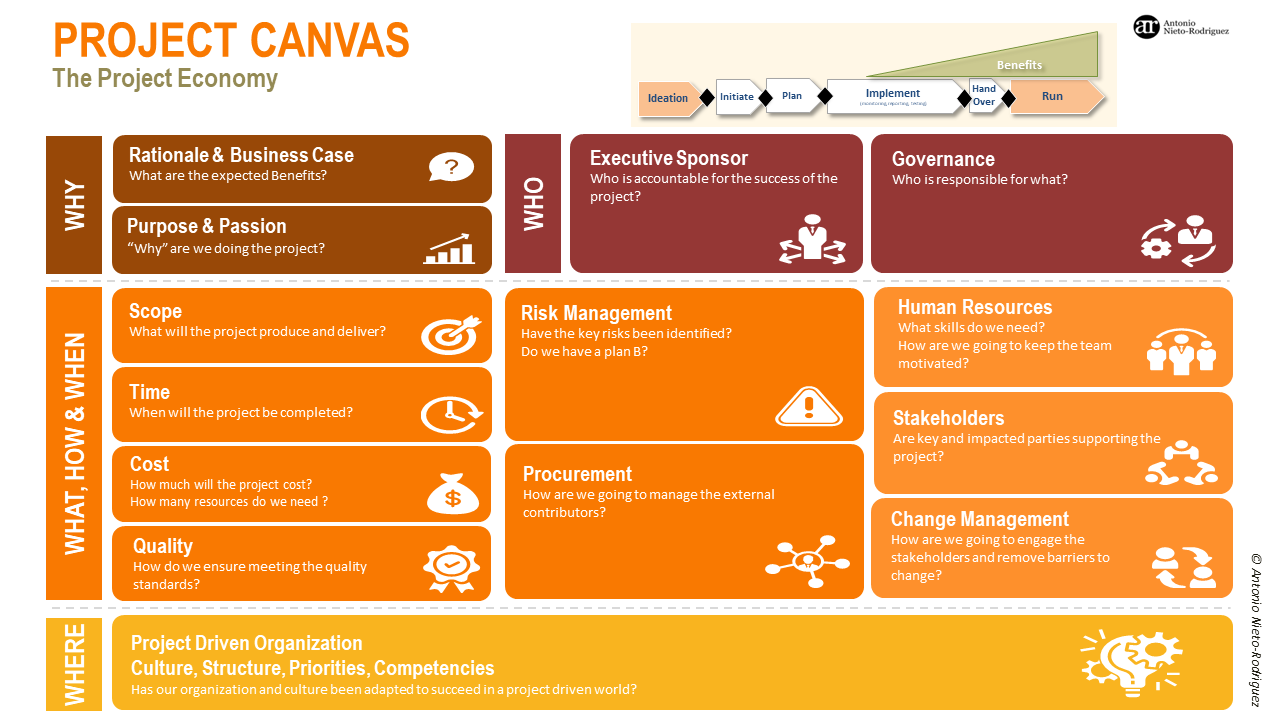
2. Governance framework
One page that defines the project's operating system: who decides (RACI), how the team meets (cadence), and how blockers escalate. The heart of it is the RACI — a grid of decisions/deliverables on rows, roles on columns; each cell is R (Responsible), A (Accountable — only one), C (Consulted), I (Informed). Built once at project start, revisited when scope changes.
The weekly cadence and the escalation path sit on the same page — structure, ritual, and safety valve together.
R = Responsible · A = Accountable (exactly one per row) · C = Consulted · I = Informed
| Decision / deliverable | Sponsor | PM | BD | R&D | QA | Prod |
|---|---|---|---|---|---|---|
| Approve project charter & scope | A | R | C | C | C | C |
| Approve a spec / requirement change (CR) | A | R | C | C | C | C |
| Final formulation sign-off | I | I | C | A | C | I |
| QA / stability test plan & product release | I | I | C | C | A | I |
| Customer communication & commercial terms | I | C | A | I | I | I |
| Pilot batch & production readiness | I | I | I | C | C | A |
| Weekly status report to leadership | I | A | C | C | C | C |
| Meeting | Length | Who | Focus |
|---|---|---|---|
| Team weekly | ~30 min | Each Function Lead | Activities & blockers in that function |
| Project weekly | ~60 min (Thu 09:00) | PM + Function Leads | Cross-functional decisions, RAID review, status |
| Portfolio weekly | ~60 min | Sponsor + PMs | Priorities & resource conflicts across projects |
3. RAID log
One living register that covers what four separate documents would: Risks (might happen), Actions (to do), Issues (already happening), and Dependencies (waiting on someone) — with Change folded in as a type, so the mid-project spec change is tracked too. A table with description, likelihood/impact (H/M/L), owner, next action, and status. Reviewed weekly at the team heartbeat.
The top items — and the top 3 risks — roll up to the Risk dimension of the RAG report. Flag the one dependency that is your constraint.
| ID | Type | Description | L / I | Owner | Next action | Due | Status |
|---|---|---|---|---|---|---|---|
| C-01 | Change | Customer changed flavor (lemon→peach) and dose (2,500→5,000 mg) after R&D started. | — / H | PM | Log CR; re-baseline timeline (+2 wks); get Sponsor approval. | 03 Jun | In progress |
| D-01 | Dependency | [CONSTRAINT] Peach-flavor raw material has a 4-week supplier lead time — gates the pilot batch. | — / H | BD Lead | Place PO this week; confirm delivery date. | 30 May | Open |
| I-01 | Issue | QA and Production were engaged late; no pilot-line capacity is booked. | — / H | Prod Lead | Book pilot-line slot for week of 22 Jun. | 02 Jun | Open |
| R-01 | Risk | Higher 5,000 mg dose may fail dissolution / stability at room temperature. | M / H | R&D Lead | Run accelerated stability test on the new dose. | 15 Jun | Open |
| A-01 | Action | Re-baseline the project schedule once the CR is approved. | — / M | PM | Issue revised plan + new heartbeat dates. | 05 Jun | In progress |
Full example has 8 rows (R-02, I-02, A-02 follow the same pattern). Type: Risk · Action · Issue · Dependency · Change.
4. RAG report — the weekly heartbeat
The weekly 1-page status unit. Five dimensions — Scope · Schedule · Cost · Risk · Resources — each rated Green / Amber / Red, with one line of why and a named owner for every Amber or Red. Produced at the weekly project sync (Thu 09:00); its top items are pulled straight from the RAID log, and the report itself rolls up into the Session-1 portfolio dashboard. Colour is a conversation starter, not a verdict.
The weekly cadence and the escalation path that frame this heartbeat live on the Governance one-pager (tool 2) — one rhythm, three lenses (team, project, portfolio), all weekly.
| Dimension | R/A/G | Why (if not green) | Next action — owner |
|---|---|---|---|
| Scope | Amber | One spec change is in change control (CR not yet approved). | PM |
| Schedule | Red | Re-baseline +2 weeks; pilot line not yet booked. | Production Lead |
| Cost | Green | — | — |
| Risk | Amber | Stability of the higher dose is under test. | R&D Lead |
| Resources | Amber | QA & Production engaged late; capacity being secured. | Production Lead |
Top items this week roll up from the RAID log: C-01 (spec change), D-01 (material lead time — the constraint), I-01 (pilot-line capacity).
The most common failure mode is treating these tools as paperwork. A charter that nobody reads is worse than no charter — it creates a false sense of clarity. A RACI that no decision references is just a table. The tools work only when they are used in conversation, in real time, in the project.
Every artifact is an editable Office file — open, fill, and print straight from it; nothing needs special software. The charter ships with a Project Canvas alternative for fuller briefs. Each blank is the template to use Monday; each worked example uses the same NutriCol case threaded through every artifact, so you can see one project flow through the whole system.
Activity — RAG Report
In your project group, pick a real IMC project. Use the toolkit to build a 1-page RAG report — then share back across groups.
Format
- 4–5 groups · one real IMC project each
- 15 minutes to build the RAG report across all five dimensions
- Share-back: each group presents — status + one decision needed
- One servant leader per group — not the manager. A peer who draws out every voice, keeps the report honest, and speaks for the group at share-back.
Group instructions
- Pick a real IMC project your group has line-of-sight on.
- Write the 1-sentence project outcome at the top.
- Rate each dimension R / A / G: Scope · Schedule · Cost · Risk · Resources.
- For every Amber or Red: write one sentence on why, and name the owner of the next action.
- Pull the top 3 risks and any pending changes from your RAID log into the bottom section.
Share-back
Each group presents their RAG report in 3 minutes: overall colour, the one dimension in Amber or Red, and the single decision the room needs to unblock it.
When groups compare, does the same project show a different colour across dimensions? That gap is the conversation — not a mistake. Amber on Schedule means the next 5 minutes of the room.
Templates for this activity
The worked example below shows a completed RAG report — use it to learn the format, then build your own from the blank template.
Outcome: Deliver a market-ready OEM marine-collagen sachet product for the K-Beauty client, from signed brief to first mass-production batch, by 30 Sep 2026.
| Dimension | R/A/G | Why (if not green) | Next action — owner |
|---|---|---|---|
| Scope | Amber | One spec change is in change control (CR not yet approved). | PM |
| Schedule | Red | Re-baseline +2 weeks; pilot line not yet booked. | Production Lead |
| Cost | Green | — | — |
| Risk | Amber | Stability of the higher dose is under test. | R&D Lead |
| Resources | Amber | QA & Production engaged late; capacity being secured. | Production Lead |
- C-01 — Spec change in change control (Sponsor approval pending).
- D-01 — Peach-flavor material 4-week lead time (the constraint).
- I-01 — Pilot-line capacity not yet booked.
Click through to the Project Dashboard and open a specific project to see its live RAG report.
▦ Open Project DashboardSession 3 — Continuous Improvement
Less teaching, more changing. Practices change forever — principles don't.
▶ Open Section 03 SlidesOutcomes
- See your own bottleneck — apply the Theory of Constraints to project & cross-dept flow, not just the production line
- Run a Kanban board — visualize work, set WIP limits, find where work piles up
- Improve continuously — one PDCA loop on the bottleneck; re-plan at the right layer when scope shifts
- Commit to one board + one PDCA cycle on a real project next week, with a 30-day check-in booked
Ways of working keep evolving
Each era of project management was an answer to its business and technology context. Waterfall fit a slow, predictable world. Agile and DevOps answered faster, more uncertain markets. AI is the next shift — already changing how we plan, decide, and deliver.
Three moves, not a history lecture
Don't memorize the dates. Notice the pattern: Waterfall → certainty and control. Agile / DevOps → speed and adaptation. AI now → a new shift in how knowledge work is done and how decisions get made.
The lesson isn't "adopt the newest method." It's that your practices must keep evolving with your context — what worked last year is not guaranteed to work next year.
IMC has already lived through one technology shift — going from informal production tracking to ERP systems and GMP compliance. That shift required new practices. The AI shift is the same kind of move. The question is whether IMC shapes the change proactively, or adapts reactively.
Practices change. Mindset stays.
A mindset is described by values, guided by principles, and expressed as practices. Practices are unlimited — Kanban, Scrum, SAFe, and hundreds of others. Copying a practice without the mindset is why "we tried Agile and it didn't stick."
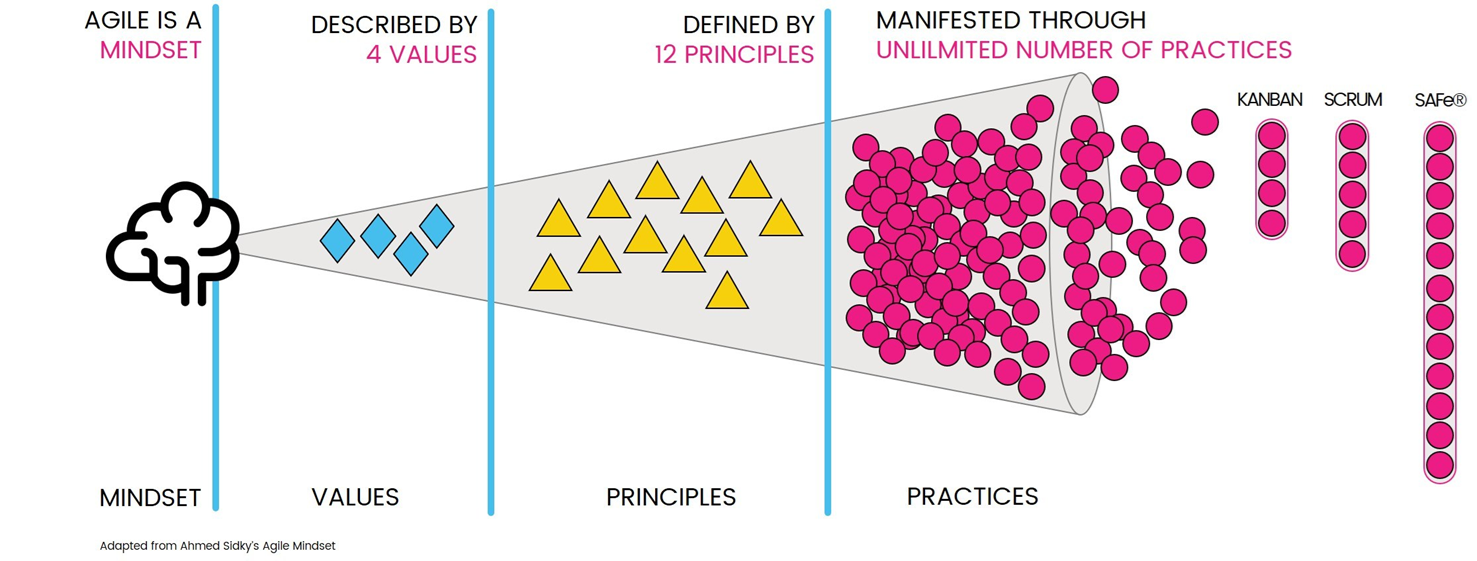
For PMs: pick the practice that fits your context
Kanban is not mandatory. Scrum is not mandatory. The mindset underneath them — make work visible, limit overload, improve continuously — is what you are adopting. The practice is how you express it in your context. If a practice is not working, change the practice. Do not abandon the mindset.
For leaders: culture is the delivery mechanism
A new practice survives past the workshop if and only if the culture holds the principles. If leadership continues to reward heroics over process, and urgency over planning, no practice will stick — regardless of how good the training was.
Teams cargo-cult the ceremony — daily stand-ups, boards, sprint reviews — without the underlying mindset. The ceremony becomes overhead. The team concludes "Agile doesn't work here." The real issue: the mindset was never adopted, only the form.
A chain is no stronger than its weakest link
The Theory of Constraints asserts that every system has one constraint — a bottleneck — that governs the whole output. Improving anything that is not the constraint does not improve the system. To get the greatest result, identify the constraint and focus there.
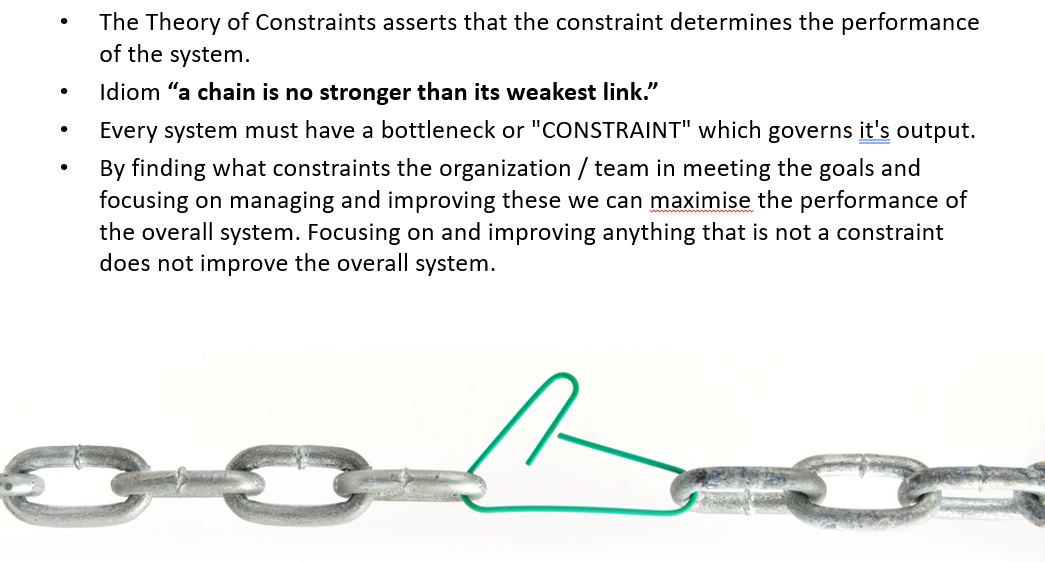
The leap for project management
You already apply this logic on the production line. The same lens applies to project flow across departments. The surveyed complaint — "each department rushes its own part without coordinating with others" — is a subordination failure. Speeding up a non-constraint department makes the whole system worse, not better: it builds queue in front of the actual bottleneck.
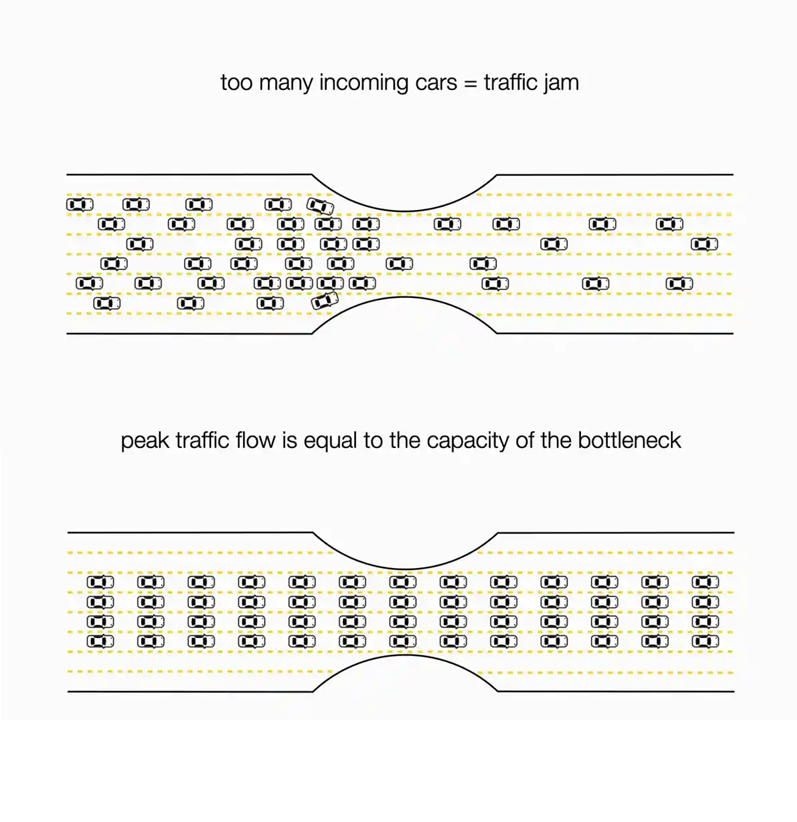
Five focusing steps
- Identify the one constraint governing output
- Exploit it — get the most from it as it exists now
- Subordinate everything else to support the constraint
- Elevate it — add capacity if still needed after the first two steps
- Repeat — the constraint will move once relieved; start again
Fix the weakest link — not the loudest one. The loudest complaint in a project is rarely the actual constraint. The constraint is where work piles up and waits.
Kanban — a strategy for the flow of value
Before you draw a single board, get the idea right. Kanban is not the sticky notes — it is a strategy for making value flow smoothly through a process, built on three practices that only work when used together.
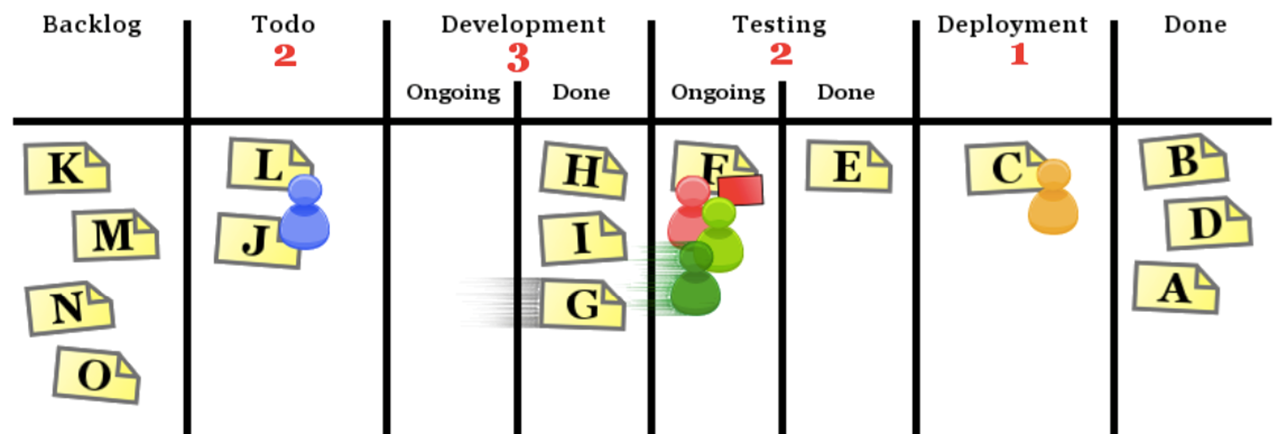
Definition of Kanban
Kanban is a strategy for optimizing the flow of value through a process. It comprises the following three practices working in tandem:
- Defining and visualizing a workflow
- Actively managing items in a workflow
- Improving a workflow
In their implementation, these Kanban practices are collectively called a Kanban system.
"Flow of value" is the point — not busyness. A workflow that looks fully loaded but stalls at a handoff is not flowing value. The three practices are how we make that flow visible, manage it, and improve it — which is exactly what the next two pages put into practice.
Lean — maximize value, eliminate waste
Kanban's "flow of value" idea comes from Lean. Lean is a way of thinking about a process: pull as much value as possible to the customer while removing everything that does not add value. Two ideas carry it — the principles that define the goal, and the wastes that name what gets in the way.
Lean Principles
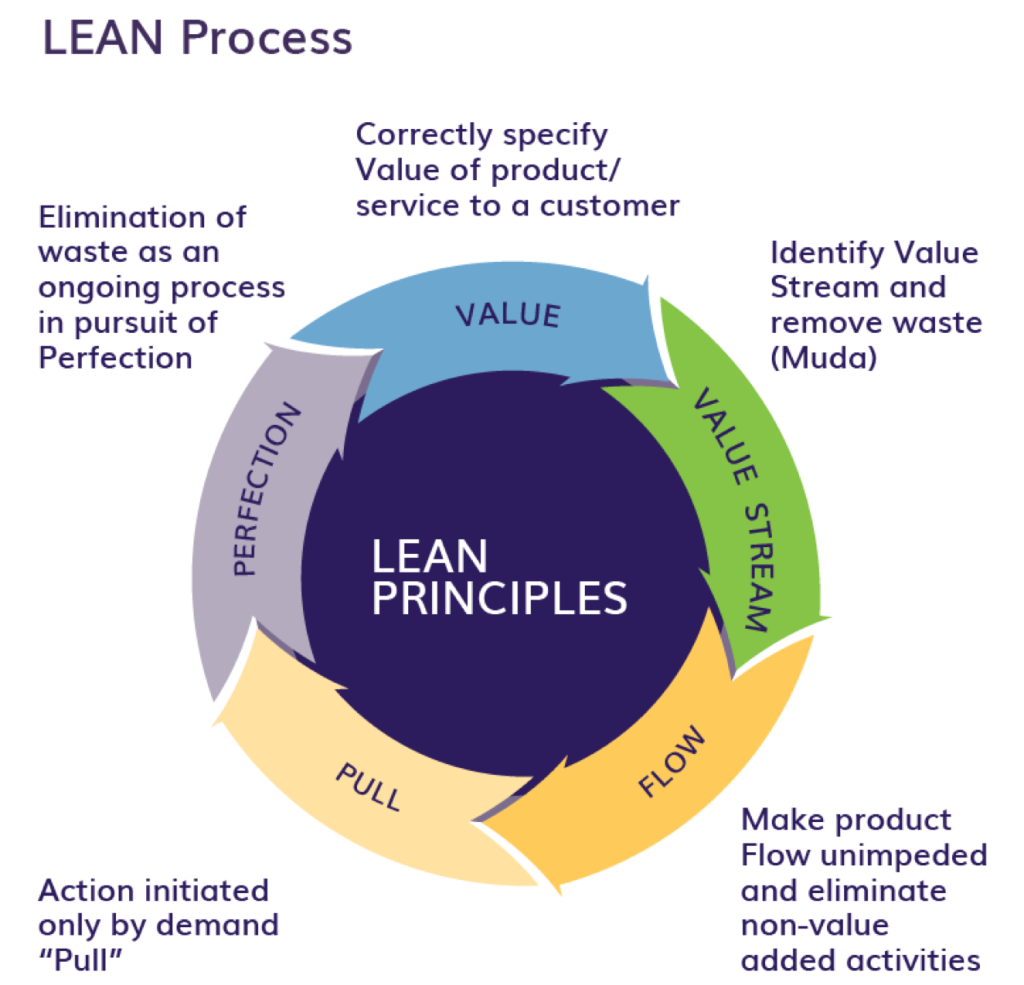
- Value — define value from the customer's point of view, not the producer's.
- Value stream — map every step that takes a request to delivery; see where value is and is not added.
- Flow — make the valuable steps move smoothly, without stops, queues, or rework.
- Pull — let downstream demand trigger work, so nothing is made before it is needed.
- Perfection — repeat the cycle, removing more waste each time.
7 Wastes of Lean
Lean targets seven specific kinds of waste — work that consumes time, people, or money without adding value the customer would pay for. A handy mnemonic is TIM WOOD.
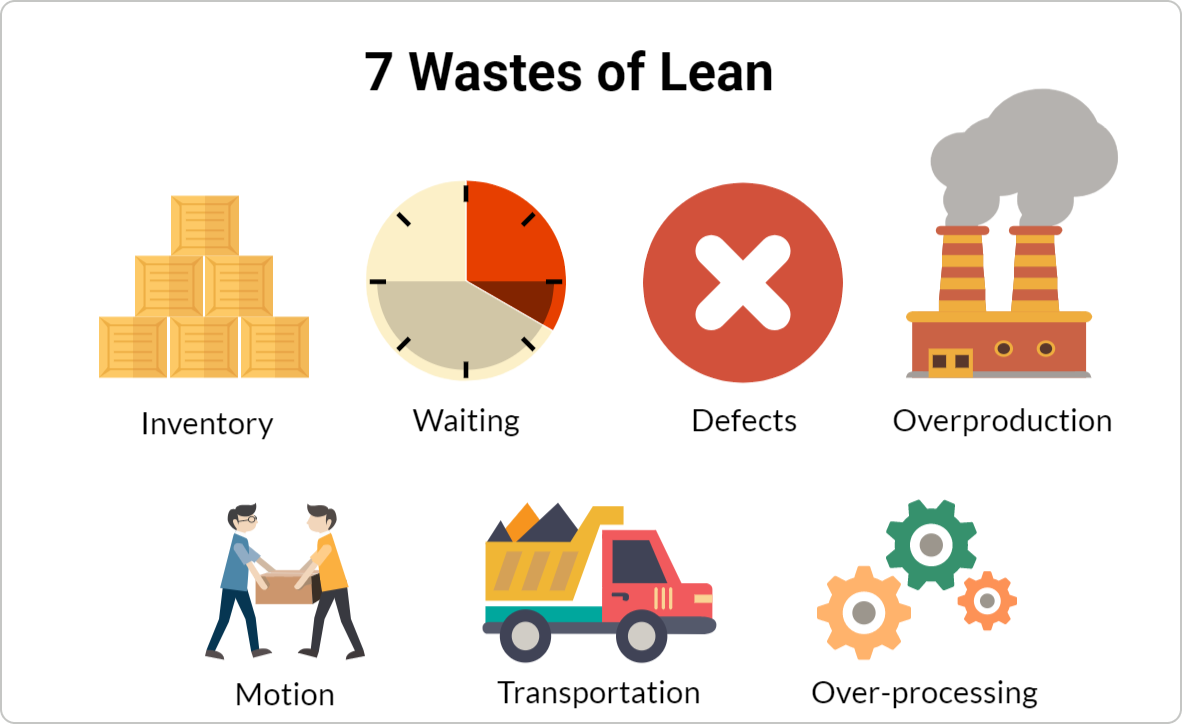
- Transport — moving materials, documents, or work between people and places unnecessarily.
- Inventory — work, stock, or requests piling up and waiting instead of being processed.
- Motion — unnecessary movement of people searching for information, tools, or approvals.
- Waiting — idle time when work sits between steps, waiting on a handoff or a decision.
- Overproduction — producing more, sooner, or faster than the next step actually needs.
- Over-processing — doing more work or adding more detail than the customer requires.
- Defects — errors and rework that force the work to be done again.
The survey complaints map straight onto these wastes: cross-department handoffs are Waiting and Transport; scope changes that force rework are Defects; plans that do not match reality create Overproduction. Naming the waste is the first step to removing it — which is what the Kanban board on the next page makes visible.
Activity — see your flow, find your bottleneck
Each group takes a real project. Production's new-factory-construction case is the lead board; every group maps its own. The goal: make work visible, make the bottleneck obvious, and see it connect directly to the Theory of Constraints logic from the previous page.
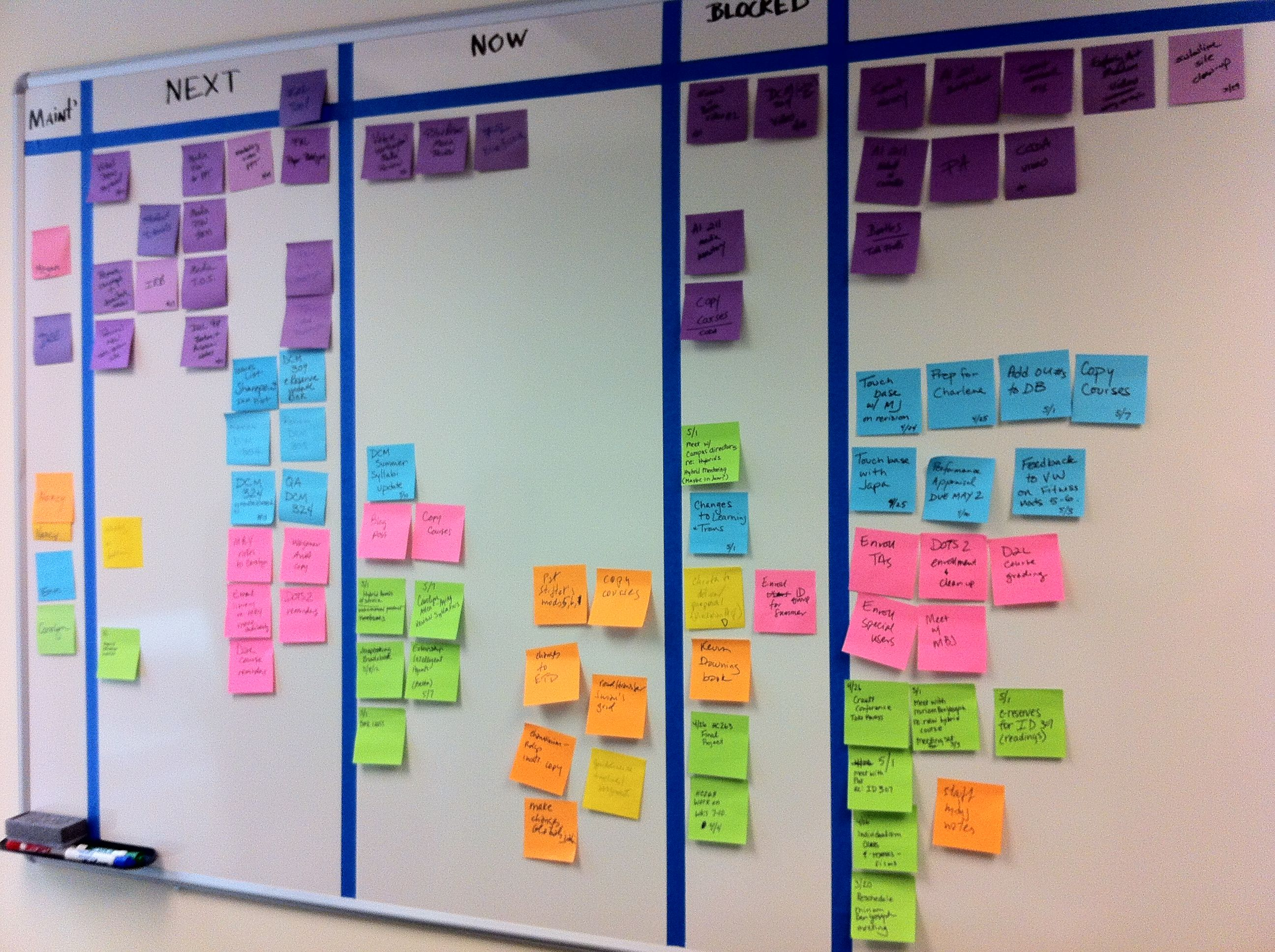
Facilitation sequence
- Visualize the workflow — columns: To Do · In Progress · Done. Add real stages (e.g., Design, Approve, Build, QA). Put this week's actual work items on cards.
- Set a WIP limit — cap each column. Notice what you have to stop starting to stay within the limit.
- Find the bottleneck — where do cards pile up or wait longest? That is your constraint. It is usually a handoff between functions.
- Make policies explicit — one rule per column for how a card moves forward. Write it on the board.
Where cards wait is where your project is actually losing days — almost always a handoff between departments, exactly what IMC's survey flagged. The board makes it visible so the team fixes the right thing.
Photograph your board before the session ends. Run it next week on the same project — same columns, same WIP limits. That is your commitment.
Keep moving — improve in loops
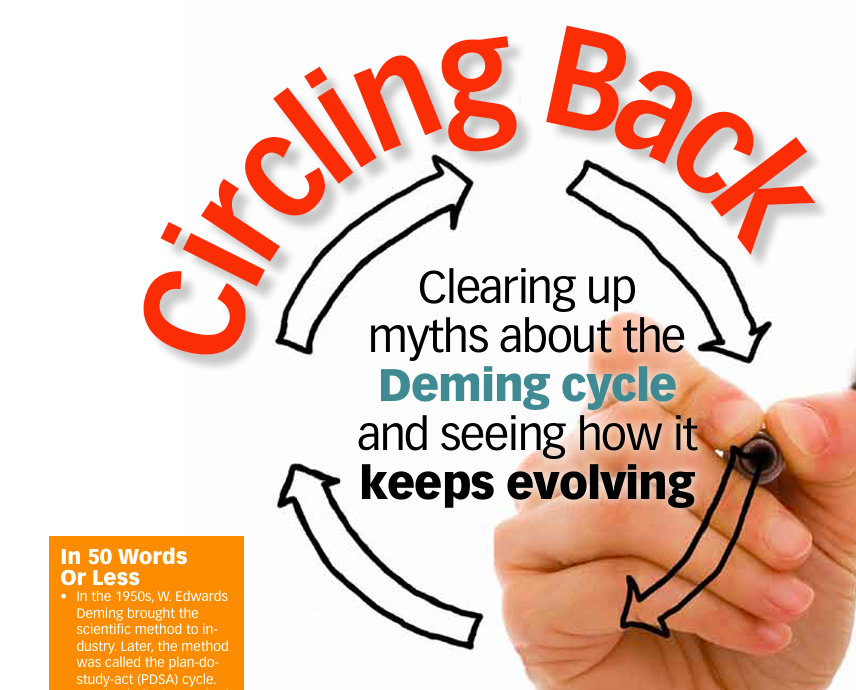
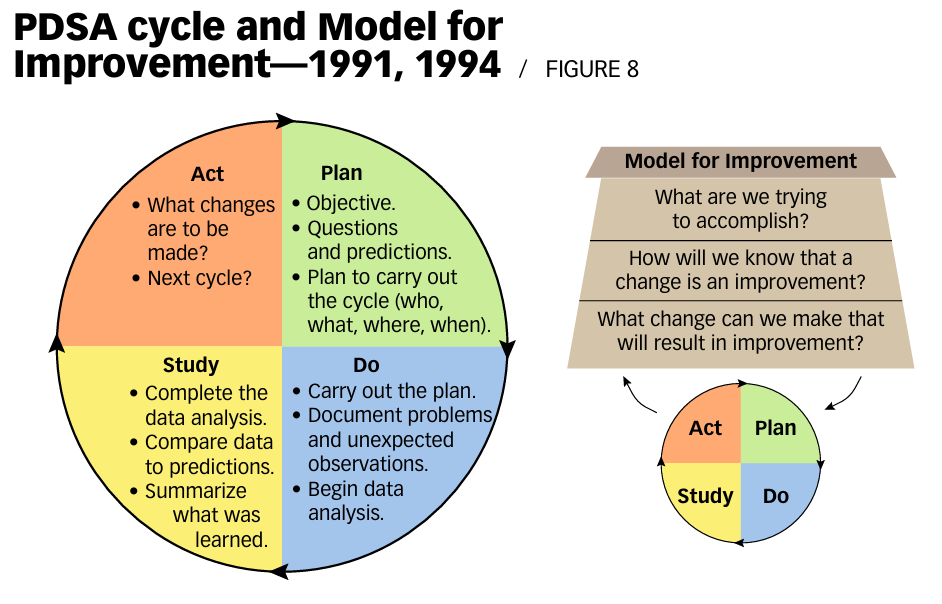
PDCA (Plan–Do–Check–Act) — also known as the Deming cycle — is the engine that makes improvement continuous instead of a one-time event. Each turn of the loop turns what you learned last week into what you change next week.
Run one PDCA loop now — on the bottleneck you just found
- Plan — pick one change to relieve the bottleneck (a new handoff policy, a WIP limit adjustment, a clearer ownership rule)
- Do — run the change next week on the same project
- Check — did the pile shrink? Did wait time at that stage drop?
- Act — if yes, keep it and look for the next constraint. If no, adjust or try something else.
Lessons learned — reframed
They don't live in a document at project close. They live in next week's plan: what the Check step revealed → what the Act step changed. Continuous, applied immediately. No archaeology required.
PDCA vs PDSA — a distinction Deming insisted on
Over the years, Deming had strong beliefs about the PDCA cycle and clearly wanted to distinguish it from the PDSA cycle (Plan–Do–Study–Act). At a roundtable discussion on product quality at the U.S. Government Accounting Office, Deming was asked how the QC circle (referring to PDCA) and the Deming circle related.
"They bear no relation to each other," Deming said. "The Deming circle is a quality control program. It is a plan for management. Four steps: Design it, make it, sell it, then test it in service. Repeat the four steps, over and over, redesign it, make it, etc. Maybe you could say that the Deming circle is for management, and the QC circle is for a group of people that work on faults encountered at the local level."
Plan in layers — not all at once
Adaptive planning at multiple layers ensures that when scope shifts, teams re-plan at the right altitude — not rebuild the entire plan from scratch. The plan is not one document; it is a set of nested loops running at different cadences.
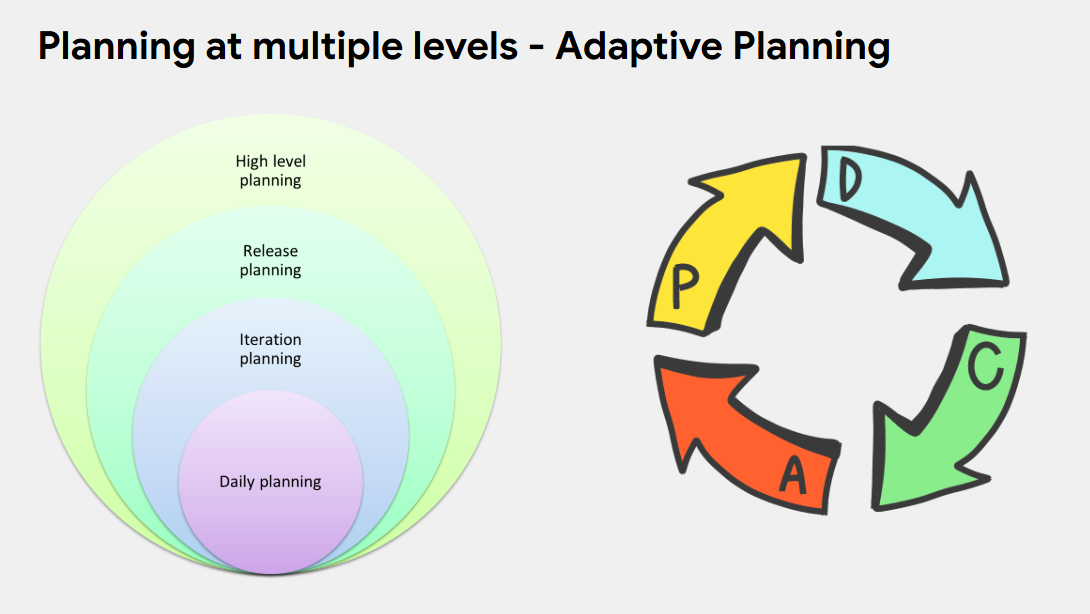
Four loops, four cadences
- Daily — the stand-up. What's the plan for today, what's in the way? Adjust within the day.
- Weekly — the iteration. Re-plan this week's commitments against what last week actually delivered.
- Monthly — the milestone / release review. Re-check scope and priorities; re-baseline if reality has moved.
- Annually — the goals and roadmap. The outer frame that sets direction and rarely changes.
Plan at the right layer
When scope shifts mid-project, the instinct is to rewrite everything. The right move: re-plan the inner loops (today's tasks, this week's iteration) while keeping the outer loops (the monthly milestones, the annual goal) stable. Inner loops flex often; outer loops hold.
Recommended reading
A short, deliberately curated list. More reading is not the goal — applying what is here is.
Standards & frameworks
- PMBOK Guide 8th Edition — the primary reference for this course. PMI members can download free; non-members can purchase on pmi.org.
- Vargas Process Flow — Ricardo Vargas's 1-page visual of all 40 PMBOK processes. You received a printed copy; the original is at ricardo-vargas.com.
- Project Canvas by Antonio Nieto-Rodriguez — a 1-page project brief format. Download the Canvas Guide (PDF) for facilitation tips.
Books
- The Phoenix Project by Gene Kim — fiction, but the most clarifying book on cross-functional work and bottlenecks. Read it for the systems thinking, not the IT setting.
- Making Things Happen by Scott Berkun — practical PM written in plain language, no jargon.
- Scrum: The Art of Doing Twice the Work in Half the Time by Jeff Sutherland — the original Scrum book, written by the co-creator. Practical and fast to read.
- The Five Dysfunctions of a Team by Patrick Lencioni — a leadership fable on why teams fail and what actually fixes them. Directly applicable to project sponsors and steering committees.
- The Toyota Way to Lean Leadership by Jeffrey Liker & Gary Convis — how Toyota builds leaders who sustain continuous improvement. Read this for the discipline behind Agile.
AI adoption — the business brain
The course gave IMC an operating model and four lightweight tools. The next horizon is an AI layer on top of the knowledge those tools already produce — a business brain managers can ask.
The idea — a business brain
Imagine an assistant that has read everything IMC writes down: the charters, the governance one-pagers, the RAID logs, the RAG reports — plus the ops side, the SOPs and process docs. Not a generic chatbot, but one grounded in IMC's own documents. A single source of truth managers can question in plain language.
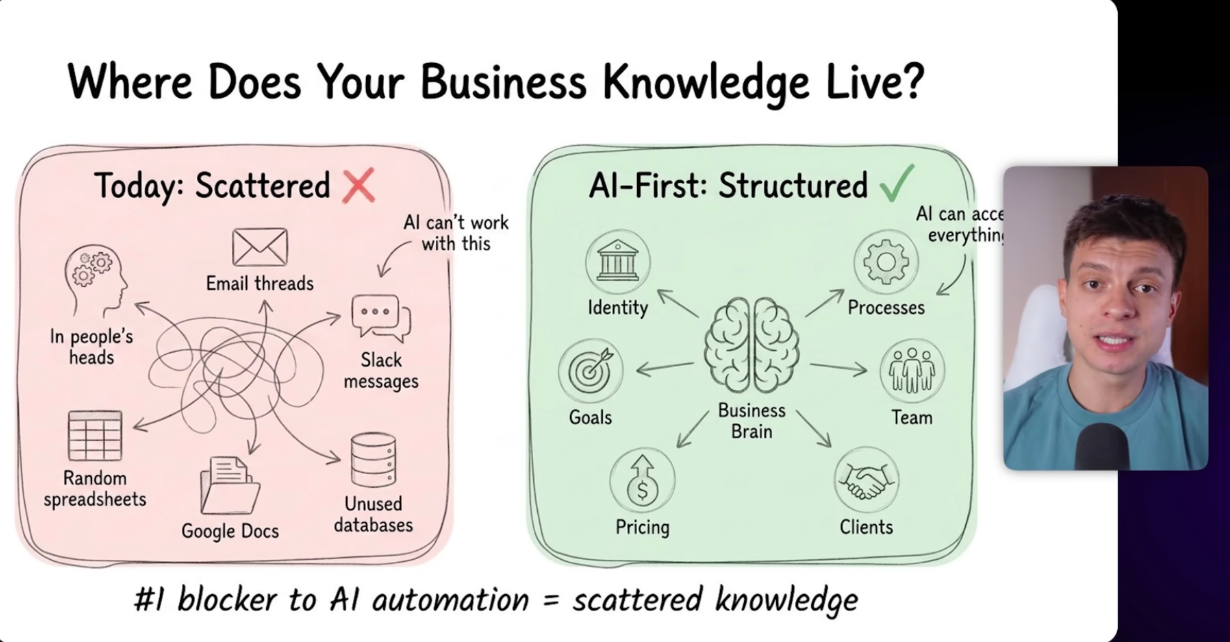
Why it matters for managers
- One place for projects and operations. Oversee both from the same brain instead of switching between people, files, and meetings to assemble the picture.
- Query facts, don't chase people. "Which projects are amber on schedule and why?" gets answered from the logs in seconds — not three emails and a day's wait.
- Decisions from data, not volume. The brain answers from what's written and recorded, so the call follows the facts rather than the loudest voice in the room.
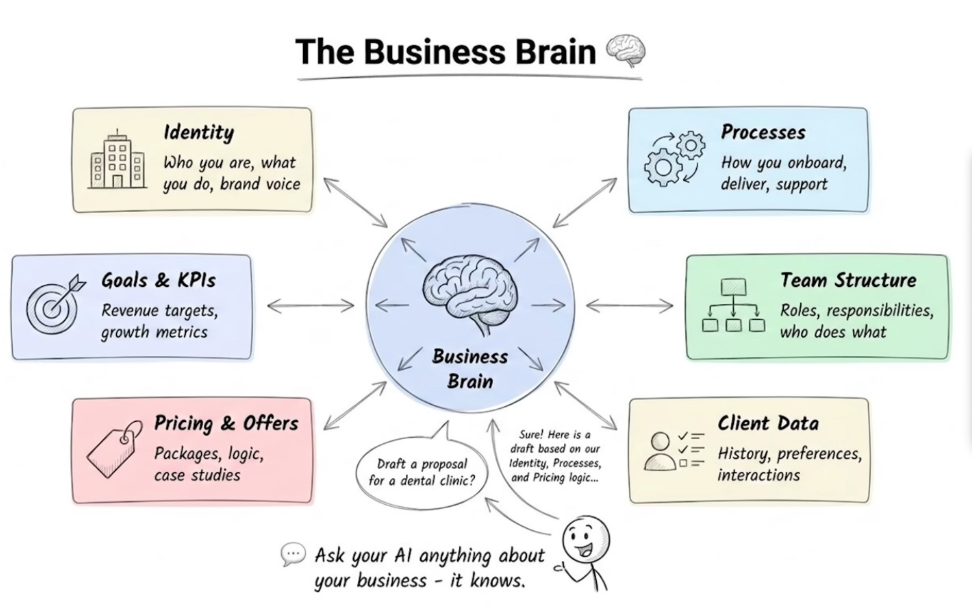
Why the course is the foundation
A business brain is only as good as the structured knowledge feeding it. The four tools are what make IMC's knowledge legible to AI: a charter says what a project is, governance says who decides, RAID says what's at risk, RAG says how it's tracking. Standardize the inputs first — the AI layer comes after the discipline, not instead of it.
Guardrails
The brain surfaces facts; it does not own decisions. People stay accountable for the call — the AI makes sure the call is made with the full picture in view, not in place of judgment.
You don't need a big project to begin. Just start playing with Copilot or Claude on your everyday work — draft a charter, summarize a RAID log, ask questions about a document. Get a feel for what it's good at first; the bigger picture follows from there.
— the model is the start, not the finish —
Prompts — how to ask AI well
The business brain only answers as well as you ask. A prompt is just your instruction to the AI — and a little structure turns a vague reply into a usable first draft of real work.
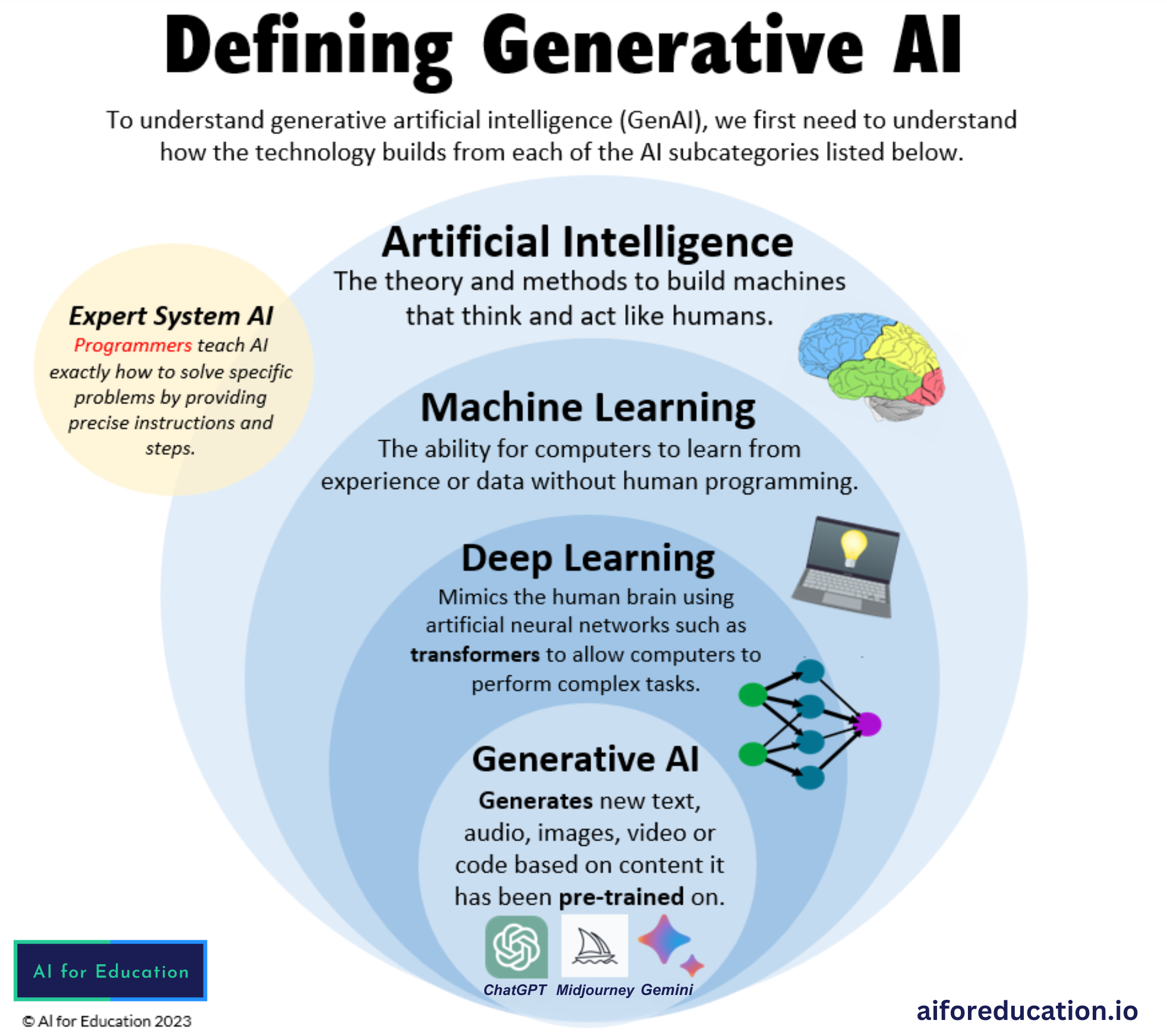
GenAI & prompts in one minute
Generative AI (Copilot, ChatGPT, Claude, Gemini) is trained to predict the most useful next words for whatever you give it. It does not "know" your project — it responds to what you put in front of it. So the input is the steering wheel: a prompt is simply the request you type. Vague in, vague out; specific in, specific out.
- It drafts, you decide. Treat every answer as a first draft to check and edit, never as the final truth.
- Context is yours to give. The model can't see IMC's reality unless you paste it in — the goal, the constraints, who's involved.
- Iterate. The first reply is the start of a conversation. Refine: "shorter," "add a risks column," "make the tone formal."
Don't paste sensitive IMC data into public AI tools. Use approved/enterprise accounts, anonymise where you can, and always sanity-check the output before it leaves your desk.
A good prompt structure — ACT
You don't need prompt-engineering tricks. One simple frame covers most PM work — ACT:
Actor → Context → Task. Read each prompt below and you'll see the same three moves every time. Once you feel it, you can write your own for anything.
ACT applied — 5 prompts for the 5 artifacts
Copy any prompt, replace the [bracketed] parts with your real project details, and paste it
into Copilot or Claude. Each one builds a first draft of a tool from this course.
Actor: You are an experienced project manager trained in PMBOK 8.
Context: We are starting a project at IMC called "[project name]". The goal is
[business objective]. The sponsor is [name/role]; the project manager is [name].
Key constraints: budget [amount], deadline [date], main stakeholders [list].
The business problem it solves: [1–2 sentences].
Task: Draft a one-page Project Charter as a table. Include: Purpose/Business
Case, Objectives, High-level Scope (in/out), Key Deliverables, Milestones,
Sponsor & PM, Key Stakeholders, Budget, and Top 3 Risks. Keep it concise
enough to fit on a single page.
Actor: You are a project manager facilitating a Project Canvas workshop
(Antonio Nieto-Rodriguez format).
Context: Project "[project name]" at IMC. Purpose: [why we're doing it].
Team: [roles]. Timeframe: [start–end]. What we know so far: [paste any notes].
Task: Fill in a Project Canvas. Give me each block with 2–4 bullet points:
Purpose, Objectives, Deliverables, Budget, Milestones, Team & Resources,
Stakeholders, Risks, and Quality criteria. Flag any block where information
is missing so we know what to ask in the workshop.
Actor: You are a PMO lead defining project governance per PMBOK 8.
Context: Project "[project name]" at IMC, involving these functions:
[e.g. BD, R&D, Production, International]. Sponsor: [name]. PM: [name].
Decisions that recur: [e.g. scope changes, budget over X, go/no-go].
Task: Produce a one-page Governance summary. Include: the decision
bodies/meetings and their cadence, a simple RACI for the key decisions
above, escalation path (who decides what, and when it goes up), and the
reporting rhythm. Present it as clear sections with short tables.
Actor: You are a project manager maintaining a RAID log (Risks,
Assumptions, Issues, Dependencies) per PMBOK 8.
Context: Project "[project name]" at IMC. Here is what's happening:
[paste a status update, meeting notes, or a paragraph describing the project].
Task: Build a RAID log as four tables — Risks, Assumptions, Issues,
Dependencies. For each Risk include: description, impact (H/M/L),
likelihood (H/M/L), owner, and mitigation. For Issues include owner and
next action. Pull entries from the context above, and suggest 2–3 likely
items I may have missed.
Actor: You are a project manager writing a weekly status report for
senior management.
Context: Project "[project name]" at IMC, week of [date]. Progress this
week: [bullets]. Schedule: [on track / slipping — detail]. Budget: [status].
Open issues/risks: [list].
Task: Write a one-page RAG (Red/Amber/Green) status report. Give an
overall RAG rating plus a RAG rating for Scope, Schedule, Budget, and Risk —
each with a one-line reason. Add: Progress this week, Plan for next week,
and Decisions/Help needed. Keep it scannable for a busy executive.
Start with the artifact you write most often. Run the prompt, edit the draft, then refine the prompt for next time. After a few rounds you'll have prompts tuned to IMC — and drafting these tools becomes minutes, not hours.
🇻🇳 Phiên bản tiếng Việt của các Prompt (bấm để mở)
Cùng cấu trúc ACT — Actor (Vai trò) · Context (Bối cảnh) · Task (Nhiệm
vụ). Thay phần trong [ngoặc vuông] bằng thông tin thật của dự án, rồi dán vào
Copilot hoặc Claude. Mỗi prompt tạo bản nháp đầu tiên cho một công cụ trong khóa học.
Cấu trúc ACT
- A — Actor (Vai trò): bảo AI đóng vai ai. "Bạn là một quản lý dự án giàu kinh nghiệm, được đào tạo theo PMBOK 8."
- C — Context (Bối cảnh): cung cấp tình huống — dự án, mục tiêu, ràng buộc, những người liên quan, dữ kiện cần dùng. Chất lượng câu trả lời nằm phần lớn ở đây.
- T — Task (Nhiệm vụ): nói rõ cần tạo ra gì và theo định dạng nào — tên tài liệu, bố cục, độ dài.
Vai trò: Bạn là một quản lý dự án giàu kinh nghiệm, được đào tạo theo PMBOK 8.
Bối cảnh: IMC đang khởi động dự án tên "[tên dự án]". Mục tiêu là [mục tiêu
kinh doanh]. Nhà tài trợ: [tên/chức danh]; quản lý dự án: [tên].
Ràng buộc chính: ngân sách [số tiền], thời hạn [ngày], các bên liên quan [danh sách].
Vấn đề kinh doanh cần giải quyết: [1–2 câu].
Nhiệm vụ: Soạn một bản Tuyên bố Dự án (Project Charter) một trang dạng bảng.
Gồm: Mục đích/Lý do kinh doanh, Mục tiêu, Phạm vi tổng thể (trong/ngoài),
Sản phẩm bàn giao chính, Các mốc thời gian, Nhà tài trợ & PM, Bên liên quan
chính, Ngân sách, và 3 Rủi ro hàng đầu. Ngắn gọn vừa đủ một trang.
Vai trò: Bạn là quản lý dự án điều phối một buổi workshop Project Canvas
(theo mẫu của Antonio Nieto-Rodriguez).
Bối cảnh: Dự án "[tên dự án]" tại IMC. Mục đích: [vì sao làm]. Nhóm: [vai
trò]. Thời gian: [bắt đầu–kết thúc]. Thông tin hiện có: [dán ghi chú].
Nhiệm vụ: Điền vào Project Canvas. Mỗi ô đưa 2–4 gạch đầu dòng: Mục đích,
Mục tiêu, Sản phẩm bàn giao, Ngân sách, Mốc thời gian, Nhóm & Nguồn lực,
Bên liên quan, Rủi ro, và Tiêu chí chất lượng. Đánh dấu ô nào còn thiếu
thông tin để biết cần hỏi gì trong workshop.
Vai trò: Bạn là trưởng PMO, thiết lập cơ chế quản trị dự án theo PMBOK 8.
Bối cảnh: Dự án "[tên dự án]" tại IMC, có các bộ phận tham gia:
[ví dụ: BD, R&D, Sản xuất, Phát triển thị trường quốc tế]. Nhà tài trợ: [tên].
PM: [tên]. Các quyết định thường gặp: [ví dụ: thay đổi phạm vi, ngân sách vượt X,
go/no-go].
Nhiệm vụ: Soạn bản Quản trị dự án một trang. Gồm: các cuộc họp/cấp ra
quyết định và tần suất, một bảng RACI đơn giản cho các quyết định trên,
đường leo thang (ai quyết gì, khi nào đẩy lên trên), và nhịp báo cáo.
Trình bày theo từng mục rõ ràng kèm bảng ngắn gọn.
Vai trò: Bạn là quản lý dự án duy trì nhật ký RAID (Rủi ro, Giả định,
Vấn đề, Phụ thuộc) theo PMBOK 8.
Bối cảnh: Dự án "[tên dự án]" tại IMC. Tình hình hiện tại:
[dán bản cập nhật trạng thái, biên bản họp, hoặc một đoạn mô tả dự án].
Nhiệm vụ: Lập nhật ký RAID dạng bốn bảng — Rủi ro, Giả định, Vấn đề,
Phụ thuộc. Mỗi Rủi ro gồm: mô tả, mức tác động (Cao/TB/Thấp), khả năng xảy ra
(Cao/TB/Thấp), người phụ trách, và biện pháp giảm thiểu. Mỗi Vấn đề ghi
người phụ trách và hành động kế tiếp. Lấy dữ liệu từ bối cảnh trên, và gợi ý
thêm 2–3 mục có thể tôi đã bỏ sót.
Vai trò: Bạn là quản lý dự án viết báo cáo trạng thái hàng tuần cho
ban lãnh đạo.
Bối cảnh: Dự án "[tên dự án]" tại IMC, tuần [ngày]. Tiến độ tuần này:
[gạch đầu dòng]. Lịch trình: [đúng hạn / chậm — chi tiết]. Ngân sách: [trạng thái].
Vấn đề/rủi ro đang mở: [danh sách].
Nhiệm vụ: Viết báo cáo trạng thái RAG (Đỏ/Vàng/Xanh) một trang. Đưa ra
mức RAG tổng thể và mức RAG cho Phạm vi, Lịch trình, Ngân sách, Rủi ro —
mỗi mục kèm một dòng lý do. Thêm: Tiến độ tuần này, Kế hoạch tuần tới, và
Quyết định/Hỗ trợ cần có. Trình bày dễ đọc lướt cho lãnh đạo bận rộn.
— ask well, and AI does the first draft —
Context — the fuel the prompt runs on
A prompt tells AI what to do. Context tells it what to do it with. The same prompt over rich, accurate context gives a usable draft; over thin context it guesses. Managing context well is most of the skill.
What "context" actually means
Context is everything you put in front of the AI so it can answer about your reality instead of the average of the internet. For a manager at IMC that's the project's facts: the goal, the status, who owns what, the risks, the numbers, the recent updates. The model has read the whole web but it has never read your project — unless you hand it over. Garbage or thin context in, generic out; rich, accurate context in, grounded out.
Think of the AI as a sharp new hire on day one. Brilliant, fast, but knows nothing about IMC. Context is the briefing folder you drop on their desk before asking them to draft anything.
Tips & structures to manage context
- Be specific and concrete. Names, dates, numbers, statuses — not "a project that's a bit behind." Specifics are what the AI has nothing to invent around.
- Structure it. Headings and tables beat a wall of text. The same RAID log or RAG report you already keep is well-structured context — reuse it.
- Right-size it. Enough to answer the question, not your entire drive. Irrelevant detail dilutes the signal. For a RAG report, give status + risks, not the full HR roster.
- State what's true vs. assumed. Mark unknowns ("budget TBC") so the AI flags them instead of confidently filling the gap.
- Keep a reusable context file per project. One living document — basics, scope, stakeholders, RAID, status — that you paste in and top up each week. Build it once, reuse it everywhere.
- Order matters: Actor → Context → Task. Give the briefing before the instruction, so by the time the AI reads the task it already knows the situation.
1. Basics (name, owner, phase, status) · 2. Schedule & cost · 3. Scope / work breakdown · 4. Stakeholders & people · 5. RAID (risks, assumptions, issues, dependencies) · 6. Recent updates & decisions. The five tools from this course already produce most of these blocks.
Context often is the sensitive part — budgets, names, client data. Keep confidential IMC context to approved/enterprise AI tools, and anonymise where the answer doesn't need the real names.
Try it — sample context files
Below are two ready-made context files exported from the mock projects in the Project Dashboard. Download one, then go back to the Prompts page, copy a prompt, and paste the file into the Context part. This is the fastest way to feel the difference good context makes.
🇻🇳 Tóm tắt tiếng Việt — Context là gì & cách quản lý (bấm để mở)
Context (bối cảnh) là tất cả thông tin bạn cung cấp để AI trả lời đúng thực tế dự án của bạn, thay vì trả lời chung chung. Prompt nói AI làm gì; context nói làm với dữ liệu nào. Bối cảnh tốt → bản nháp dùng được; bối cảnh sơ sài → AI đoán.
Mẹo quản lý context
- Cụ thể: tên, ngày, con số, trạng thái — đừng nói "dự án hơi chậm".
- Có cấu trúc: dùng tiêu đề và bảng. Nhật ký RAID hay báo cáo RAG bạn đang có chính là context đã được cấu trúc sẵn — hãy tái sử dụng.
- Vừa đủ: đủ để trả lời câu hỏi, không cần dán cả ổ cứng. Thông tin thừa làm loãng tín hiệu.
- Phân biệt chắc chắn vs. giả định: đánh dấu phần chưa rõ ("ngân sách chờ xác nhận") để AI cảnh báo thay vì tự bịa.
- Giữ một file context cho mỗi dự án: một tài liệu sống — thông tin cơ bản, phạm vi, bên liên quan, RAID, trạng thái — dán vào và cập nhật mỗi tuần.
- Đúng thứ tự: Vai trò → Bối cảnh → Nhiệm vụ. Đưa bối cảnh trước, ra lệnh sau.
Cấu trúc gợi ý cho file context
1. Thông tin cơ bản (tên, chủ sở hữu, giai đoạn, trạng thái) · 2. Lịch trình & chi phí · 3. Phạm vi / phân rã công việc · 4. Bên liên quan & con người · 5. RAID · 6. Cập nhật & quyết định gần đây.
Thực hành
Tải một file context mẫu ở trên (P-104 hoặc P-117), quay lại trang Prompts, sao chép một prompt, rồi dán file context vào phần Context. Bạn sẽ cảm nhận rõ sự khác biệt mà bối cảnh tốt mang lại.
Context thường chính là phần nhạy cảm (ngân sách, tên người, dữ liệu khách hàng). Chỉ dùng tài khoản AI được phê duyệt/doanh nghiệp, và ẩn danh khi câu trả lời không cần tên thật.
— good context is the real prompt engineering —
AI courses — where to start learning
You don't need a technical background to get good at AI — you need a little structure and a few hours. These three free, beginner-friendly courses build the exact skills this section talks about: asking well, working with AI, and going one step beyond chat.
Start here — three beginner courses
Do them in order: Prompting for the everyday skill, AI Fluency for the judgment to use it well at work, then the Build Skills video to see where it goes next. A couple of hours total — then bring it straight back to your own RAID logs and RAG reports.
Practice on non-sensitive material first. When you move to real IMC work, use approved/enterprise AI accounts and keep confidential data out of public tools.
— a few hours now, a new way of working after —
Use cases — AI for market entry
Two real IMC ambitions, worked end to end: taking a tea product into the United States, and a gummy-candy product into Singapore. For each step of getting in, you'll see a sample prompt and the prompt technique that fits it — so you can copy the move, not just the words.
How to read this page
Each case is a short roadmap of the stages to enter the market. At the key stages we drop in a prompt you can adapt, and we name the technique it demonstrates. The point isn't the specific regulation — rules change and must be verified — it's the way of asking that turns AI into a research and drafting partner for work like this.
Export law, food standards, labeling and certification rules change and differ by product. Treat every regulatory answer below as a lead to confirm, not a fact — check it against official sources (e.g. fda.gov for the US, sfa.gov.sg for Singapore) and a qualified consultant before acting. Every prompt here asks the AI to cite its sources and flag what it isn't sure of — keep it that way.
The technique toolkit
These build on ACT (Actor → Context → Task) from the Prompts page. Same frame, a few extra moves for bigger, research-heavy work.
Case A — exporting IMC tea to the United States
A rough roadmap to get a packaged tea onto US shelves. Treat it as the skeleton you ask AI to flesh out and keep current — not a finished compliance plan.
- 1 · Market & positioning — who buys it, at what price, against whom.
- 2 · FDA basics — food facility registration, US agent, FSMA preventive-controls expectations, prior notice for shipments.
- 3 · Labeling — Nutrition Facts panel, ingredient list, allergen statement, English-language and net-quantity rules.
- 4 · Product safety — pesticide-residue limits and lab testing for tea.
- 5 · Import logistics — HS classification, tariffs, customs broker, importer of record.
- 6 · Route to market — finding an importer/distributor and a compliance dossier to hand them.
Actor: You are an export consultant who has helped Asian food & beverage
brands enter the US market.
Context: IMC is a Vietnamese company planning to export "[tea product]" —
[loose-leaf / tea bags / RTD], [packaging], target retail price [amount].
Task: Don't write the full plan yet. First, break entering the US market into
an ordered list of stages, from research to first shipment. For each stage give a
one-line description and the main risk if we skip it. Then stop and ask me which
stage to detail first.
Actor: You are a US food-import compliance specialist.
Context: We want to import "[tea product]" into the US for retail sale.
Task: List the FDA and customs requirements to clear and sell this product:
registration, prior notice, labeling, any testing. For each item, cite the official
source (fda.gov / cbp.gov page) and mark with ⚠ anything that depends on the product
type or that you are not certain about. Note where I should confirm with a licensed
customs broker.
Actor: You are a US food-labeling reviewer.
Context: Here is our current label text and panel: [paste label].
Task: Return a checklist as a table with columns: Required element |
What FDA expects | Is it on our label? (yes/no/unclear) | Fix needed. Cover Nutrition
Facts, ingredient list, allergens, net quantity, manufacturer/importer, and
English-language rules. Cite the source for each requirement.
Actor: You are an export project manager trained in PMBOK 8.
Context: IMC wants a project plan to launch "[tea product]" in the US within
[timeframe], budget [amount].
Task: Before drafting anything, ask me up to 10 questions about the product,
our resources, timeline and constraints that you need to build a realistic plan.
Wait for my answers, then draft a one-page project charter with milestones and the
top 5 risks.
Actor: You are a strict FDA reviewer looking for reasons to reject an
import.
Context: Here is our compliance dossier and label: [paste].
Task: Reason step by step through what an inspector would check. List every
gap or weakness that could cause a hold or refusal, ordered by how likely it is to
stop us, with a concrete fix for each. Be tough — assume nothing is fine unless
the evidence is in the dossier.
FDA and customs requirements turn on the exact product, ingredients and claims. Use these drafts to get organised fast, then confirm the specifics with FDA's official guidance and a licensed customs broker before you commit money or make a shipment.
Case B — bringing IMC gummy candy to Singapore
This mirrors the mock P-117 · Singapore Export project from the Context page — a registration project that went red on a rejected dossier. A good prompting workflow is exactly how you avoid that. Roadmap:
- 1 · Market research — demand, competitors, retail channels, price point.
- 2 · Import licensing — Singapore Food Agency (SFA) importer registration and food-import requirements.
- 3 · Product & labeling rules — Sale of Food Act / Food Regulations: permitted additives and colours, labeling and health-claim rules.
- 4 · Ingredients & halal — gelatin source, and whether MUIS halal certification fits the target shoppers.
- 5 · Quality & testing — microbiological and contaminant standards, lab testing.
- 6 · People — food-safety / hygiene training the importer and handlers need.
- 7 · Dossier — assembling certificates and documents for registration.
Actor: You are a consultant who helps food brands enter Singapore.
Context: IMC wants to sell "[gummy candy product]" in Singapore retail.
Ingredients: [list]; gelatin source: [bovine / porcine / plant].
Task: Break market entry into an ordered list of stages, research to first sale.
For each: a one-line description, who in IMC would own it, and the main risk. Then ask
me which stage to detail first.
Actor: You are a Singapore food-import & regulatory specialist.
Context: We want to import and sell "[gummy candy product]" in Singapore.
Task: List what's required to import and sell it legally: SFA importer
licensing, product and additive/colour rules, labeling, any testing, and which
certificates we need (and whether MUIS halal applies given our gelatin source).
For each item cite the official source (sfa.gov.sg / muis.gov.sg) and mark ⚠ anything
uncertain or product-dependent.
Actor: You are a food-ingredient compliance analyst.
Context: Our ingredient list: [paste]. Target market: Singapore, including
Muslim consumers.
Task: Review each ingredient. Use this format for every row, like the example:
  • Citric acid — permitted additive in SG | halal: yes | note: confirm INS number on label
Flag any additive/colour that may be restricted, and any ingredient (esp. gelatin)
that blocks halal certification. Cite the rule and mark ⚠ where unsure.
Actor: You are a food-safety manager preparing a Singapore market launch.
Context: IMC will work with a local importer/distributor for "[gummy candy
product]".
Task: Produce a checklist as a table with columns: Requirement | Who must
do it (IMC / importer) | Evidence needed | Status. Cover food-hygiene training,
storage/handling SOPs, traceability and documentation. Cite the SFA source for each
and mark ⚠ where it depends on the licence type.
Actor: You are a project manager reviewing a stalled registration project.
Context: [Paste the P-117 Singapore Export context file from the Context page.]
Task: Reason step by step: given this status, why is the dossier likely getting
rejected, and what's the critical path to fix it? Show your reasoning, then give a
prioritised action list with the single highest-impact next step at the top.
SFA, additive, labeling and MUIS halal rules are specific and change over time. Use these prompts to map the work and draft fast, then verify every requirement on sfa.gov.sg / muis.gov.sg and with your importer before submitting a registration dossier.
Decomposition to turn a goal into stages · Interview-first when the AI needs your context · Source-cited research for anything legal or factual · Structured output when you need a checklist or table to act on · Few-shot to lock a format · Chain-of-thought for risk and judgement calls · Critique & refine to harden a draft before it goes out.
— the AI does the legwork; the verifying is still yours —
🇻🇳 Tóm tắt tiếng Việt — Hai use case xuất khẩu & kỹ thuật prompt (bấm để mở)
Trang này lấy 2 tham vọng thực tế của IMC — đưa trà sang Mỹ và kẹo dẻo sang Singapore — làm ví dụ để demo cách dùng AI cho công việc thâm nhập thị trường. Mỗi case là một lộ trình các bước vào thị trường; ở mỗi bước có một prompt mẫu và tên kỹ thuật prompt phù hợp.
Bộ kỹ thuật prompt (mở rộng từ ACT)
- Phân rã (Decomposition): nhờ AI chia mục tiêu lớn thành các bước theo thứ tự trước khi làm.
- Hỏi-ngược (Interview-first): bảo AI đặt câu hỏi cho bạn trước để lấy đủ bối cảnh rồi mới soạn.
- Trích nguồn (Source-cited): yêu cầu AI nêu nguồn chính thống và đánh dấu ⚠ chỗ chưa chắc — để bạn kiểm chứng.
- Định dạng có cấu trúc: yêu cầu trả về bảng/checklist để dùng được ngay.
- Few-shot: cho một ví dụ mẫu rồi nhờ làm phần còn lại theo đúng khuôn.
- Lập luận từng bước (Chain-of-thought): nhờ AI suy luận trước khi kết luận — hợp cho phân tích rủi ro.
- Phản biện & tinh chỉnh: đưa bản nháp của bạn cho AI đóng vai người duyệt khó tính để tìm lỗ hổng.
Case A — Trà sang Mỹ
Các bước: nghiên cứu thị trường → đăng ký cơ sở với FDA & FSMA → nhãn mác (Nutrition Facts, thành phần, dị ứng, tiếng Anh) → dư lượng thuốc trừ sâu & kiểm nghiệm → logistics nhập khẩu (mã HS, thuế, hải quan) → tìm nhà nhập khẩu/phân phối. Prompt 01–05 minh hoạ phân rã, trích nguồn, checklist, hỏi-ngược, và phản biện.
Case B — Kẹo dẻo sang Singapore
(Liên hệ dự án mẫu P-117 · Singapore Export ở trang Context.) Các bước: nghiên cứu thị trường → giấy phép nhập khẩu SFA → quy định sản phẩm & nhãn (phụ gia, phẩm màu, công bố) → nguồn gelatin & chứng nhận halal (MUIS) → tiêu chuẩn chất lượng & kiểm nghiệm → đào tạo an toàn thực phẩm → hồ sơ đăng ký. Prompt 06–10 minh hoạ các kỹ thuật tương ứng.
Luật xuất khẩu, tiêu chuẩn thực phẩm, nhãn mác và chứng chỉ thay đổi theo thời gian và theo từng sản phẩm. Hãy coi mọi câu trả lời về quy định là gợi ý cần xác nhận, không phải sự thật — đối chiếu với fda.gov (Mỹ), sfa.gov.sg / muis.gov.sg (Singapore) và chuyên gia trước khi hành động.
Build your own dashboard with Claude
In Session 1 you sketched the IMC Project Dashboard on paper. Here you turn it into a real, live dashboard with Claude — no coding — and make it look like the version you saw on screen.
What you'll build
A single-screen project portfolio dashboard: one place that shows every project in your department, its status, owner, next milestone, and the decision it needs. Four pieces:
What you need
- Your own Claude account — one that shows a live preview panel (Claude calls it an Artifact) so you can see the dashboard as it's built.
- The IMC design brief is embedded in Step 1 — no separate copy needed. Optionally download the file to attach to Claude instead of pasting.
- About 10–15 focused minutes, and your department's project list when you're ready to make it real.
How Claude builds it — in one minute
You type a prompt; Claude writes the dashboard and shows it in a side panel you can see and click; you tell it what to change in plain language and it updates; when it looks right, you download the HTML file or share a link. The trick: keep all the steps in one chat so Claude remembers the design and the data as you go.
Every reply is a first version, not the final word. Look at the preview, then steer — "make the status pills smaller," "sort red projects to the top," "the header colour is off." Five small nudges beat one giant prompt.
The 3 steps
Do these in order, in the same chat. After each step, look at the preview and steer before moving on.
Step 1 — build it. One prompt gives Claude the design brief, the layout rules, and the sample data — the full dashboard appears in one shot.
Actor: You are a senior project manager and a UI designer.
Context: I'm building a single-screen "IMC Project Portfolio Dashboard" as
ONE self-contained HTML file (inline CSS, no frameworks, light theme).
Design system — fonts: Plus Jakarta Sans for body/UI, IBM Plex Mono for
numbers/IDs/dates. Colours: bg #f3f1ec · card #fff · border #e6e1d4 ·
ink #1a1d24 · ink-2 #4b5163. Dept pills (text/bg): BD #2563eb/#eaf1ff ·
R&D #7c3aed/#f1ebff · Production #c2410c/#fdebd9 · Int'l Market #0f766e/#d9f0ed.
Status pills: Green #15803d/#dcf3e1 · Amber #b45309/#fdebc9 · Red #b91c1c/#fbdcdc.
Layout: 1440px centred frame, top bar → KPI strip (4 cards) → projects table.
Quiet hairline borders, NO heavy shadows — a calm "operations console" feel.
Task: Build the complete dashboard with this sample data. Department filter
chips in the top bar should filter the table rows.

P-104 | Collagen Serum — New Product Line A | R&D | Formulation | Amber | Linh Nguyễn | Stability test results (May 25) | —
P-098 | Factory Expansion Phase 2 — Bắc Ninh | Production | Construction | Green | Hùng Trần | Equipment delivery wk 23 | —
P-117 | Export Market Entry — Singapore | Int'l Market | Registration | Red | Mai Phạm | HSA dossier resubmit (May 30) | Approve rework budget
P-122 | Vitamin C OEM (BD → R&D handoff) | BD | Cross-dept handoff | Red | Anh Lê | R&D kick-off — gated (Jun 13) | Escalate R&D capacity
P-089 | Probiotic Capsules — Reformulation | R&D | Pilot batch | Green | Thảo Vũ | Pilot batch on Line 3 (May 28) | —
P-131 | Cosmetic Line Rebrand — Skincare | BD | Concept | Amber | Quân Đỗ | Agency proposal (May 27) | Choose creative agency
P-110 | Halal Certification — UAE Export | Int'l Market | Audit prep | Amber | Hà Nguyễn | Auditor site visit (Jun 10) | —
P-125 | Packaging Line Automation | Production | Vendor evaluation | Green | Tuấn Bùi | Vendor decision (Jun 2) | Select automation vendor
To see the target you're matching, open the original dashboard in another tab.
Step 2 — improve it. Look at the preview and steer — either tell Claude what to change, or ask it to suggest improvements.
Tell Claude what you want changed in plain language, for example:
— "Sort red projects to the top of the table"
— "Add a 'last updated' timestamp under the top bar"
— "Show a count of overdue milestones in the KPI strip"
Task: Suggest 2–3 small upgrades that would make this dashboard more
useful for a weekly project review. Describe each one, then ask me which
to apply.
Step 3 — save & share. Get the file off the screen and into your team's workflow.
Task: This looks right. Give me the final HTML file to download.
After downloading:
- Upload to SharePoint — same folder where your department keeps real project raw data.
- Replace mock data with real projects — open the file in Claude or Microsoft Copilot and say: "Replace the sample rows with my real projects: [paste your list]." Update the KPI numbers to match.
Don't paste sensitive IMC data into public AI tools. Use an approved/enterprise account, anonymise where you can, and always sanity-check the output before it leaves your desk.
🇻🇳 Phiên bản tiếng Việt của các bước (bấm để mở)
Làm lần lượt 3 bước trong cùng một đoạn chat. Sau mỗi bước, xem bản xem trước rồi yêu cầu chỉnh sửa trước khi sang bước tiếp theo. Design brief đã được nhúng sẵn vào prompt bước 1 — không cần dán riêng.
Vai trò: Bạn là một quản lý dự án giàu kinh nghiệm kiêm nhà thiết kế giao diện.
Bối cảnh: Tôi muốn xây một "Bảng điều khiển danh mục dự án IMC" trên một màn hình dưới
dạng MỘT file HTML độc lập (CSS nội tuyến, không dùng framework, nền sáng).
Hệ thống thiết kế — font: Plus Jakarta Sans cho văn bản, IBM Plex Mono cho số/mã/ngày.
Màu: bg #f3f1ec · card #fff · border #e6e1d4 · ink #1a1d24 · ink-2 #4b5163.
Viên phòng: BD #2563eb/#eaf1ff · R&D #7c3aed/#f1ebff · Production #c2410c/#fdebd9 ·
Int'l Market #0f766e/#d9f0ed. Viên trạng thái: Xanh #15803d/#dcf3e1 · Vàng #b45309/#fdebc9 ·
Đỏ #b91c1c/#fbdcdc. Bố cục: khung 1440px căn giữa, thanh trên → dải KPI (4 thẻ) → bảng dự án.
Đường viền mảnh, KHÔNG đổ bóng nặng — cảm giác "bảng điều hành" yên tĩnh.
Nhiệm vụ: Xây bảng điều khiển hoàn chỉnh với dữ liệu mẫu sau. Các chip lọc phòng trên
thanh trên cùng phải lọc được các dòng trong bảng.

P-104 | Collagen Serum — New Product Line A | R&D | Formulation | Amber | Linh Nguyễn | Stability test results (May 25) | —
P-098 | Factory Expansion Phase 2 — Bắc Ninh | Production | Construction | Green | Hùng Trần | Equipment delivery wk 23 | —
P-117 | Export Market Entry — Singapore | Int'l Market | Registration | Red | Mai Phạm | HSA dossier resubmit (May 30) | Approve rework budget
P-122 | Vitamin C OEM (BD → R&D handoff) | BD | Cross-dept handoff | Red | Anh Lê | R&D kick-off — gated (Jun 13) | Escalate R&D capacity
P-089 | Probiotic Capsules — Reformulation | R&D | Pilot batch | Green | Thảo Vũ | Pilot batch on Line 3 (May 28) | —
P-131 | Cosmetic Line Rebrand — Skincare | BD | Concept | Amber | Quân Đỗ | Agency proposal (May 27) | Choose creative agency
P-110 | Halal Certification — UAE Export | Int'l Market | Audit prep | Amber | Hà Nguyễn | Auditor site visit (Jun 10) | —
P-125 | Packaging Line Automation | Production | Vendor evaluation | Green | Tuấn Bùi | Vendor decision (Jun 2) | Select automation vendor
Mô tả điều bạn muốn thay đổi bằng ngôn ngữ thông thường, ví dụ:
— "Đẩy các dự án đỏ lên đầu bảng"
— "Thêm dấu 'cập nhật lần cuối' dưới thanh trên cùng"
— "Hiển thị số mốc quá hạn trong dải KPI"
Nhiệm vụ: Gợi ý 2–3 nâng cấp nhỏ giúp bảng điều khiển này hữu ích hơn cho buổi
review dự án hàng tuần. Mô tả từng cái, rồi hỏi tôi muốn áp dụng cái nào.
Nhiệm vụ: Bản này ổn rồi. Hãy cho tôi file HTML cuối cùng để tải về.
Sau khi tải về:
- Tải lên SharePoint — cùng thư mục lưu dữ liệu dự án thật của phòng bạn.
- Thay dữ liệu mẫu bằng dự án thật — mở file trong Claude hoặc Microsoft Copilot và nói: "Thay các dòng mẫu bằng dự án thật của tôi: [dán danh sách]." Cập nhật lại các con số KPI cho khớp.
Đừng dán dữ liệu nhạy cảm của IMC vào các công cụ AI công khai. Hãy dùng tài khoản được duyệt, ẩn danh khi có thể, và luôn kiểm tra lại kết quả trước khi sử dụng.
— ask well, and Claude builds the first version —